显示标签为“CAT Caterpillar ET Diagnostic Adapter III”的博文。显示所有博文

2021年10月31日星期日

Best Quality Professional Caterpillar Diagnostic Tool from CnAutotool.com


CAT Caterpillar ET Diagnostic Tool  Product Description :
CAT Caterpillar ET Diagnostic Tool from Caterpillar provide the capability to access Electronic Control Modules (ECMs) from a personal computer. Many job-critical tasks can be performed with an electronic service tool. The user can display the status of a group of parameters (temperatures, pressures, etc.) simultaneously, view active and clear logged diagnostics, display the current configuration of an ECM and much more. The service tool works with a communication adapter to allow connection to an ECM. A graphical interface makes this software quick to learn and easy to use. A separate pull-down menu for each function enhances the “ease of use.” The version and identification of the ECM is automatically retrieved and is displayed on a summary screen when the program is started. Diagnostic tests and calibrations can also be performed.

CAT Caterpillar ET Diagnostic Tool enable service technicians to reprogram ECMs, reconfigure control system parameters, fine tune performance or diagnose the root cause of a failure the first time. These powerful tools allow service personnel to display and analyze vital performance and health information from any system quickly and accurately. The service tool communicates with any system using ATA (J1708), J1939 or the Caterpillar proprietary data link networks. The service tools provide information and features needed to help a technician diagnose problems and perform repairs and to customize and personalize the operation of a product. By allowing customers to design flexibility and configurability into a product, Caterpillar service tools stretch beyond the capabilities of preprogrammed ECMs or onboard display systems.

Cat et Caterpillar Electronic Technician Software:
Brand: Caterpillar
Region: WorldWide
Support Multi-language:English, Chinese, Danish, French, German, Italian, Japanese, Portuguese, Russian, Spanish
Support All cars of CAT
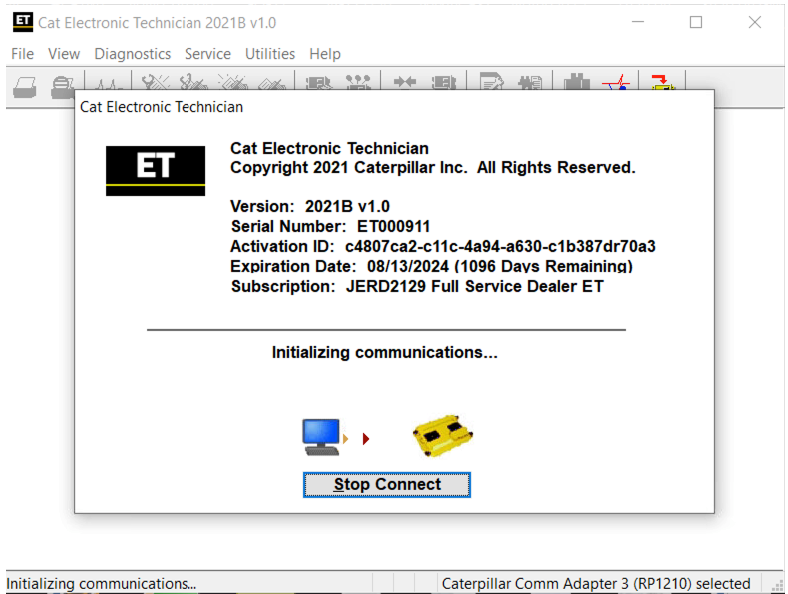
Cat et Caterpillar Electronic Technician2021B

26-5

2021B is an upgraded version of 2021A , A represents the first quarter, and C is the software updated in the third quarter.

2021B Cat ET software as Cat Caterpillar ET 2018C 2019A 2019C 2021A Software update version, 2021B Caterpillar Electronic Technician software With CAT ET 3 Cat caterpillar adapter 3 support caterpillar diagnostic till 2021.

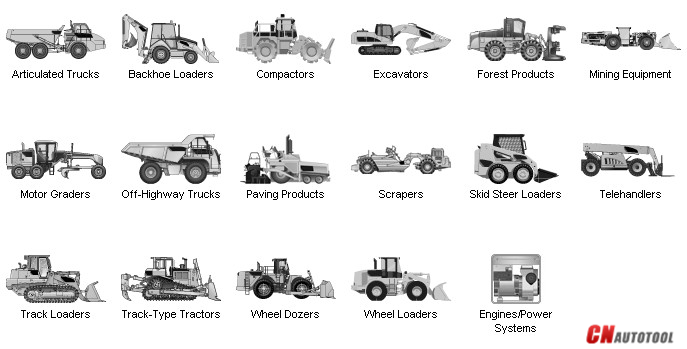
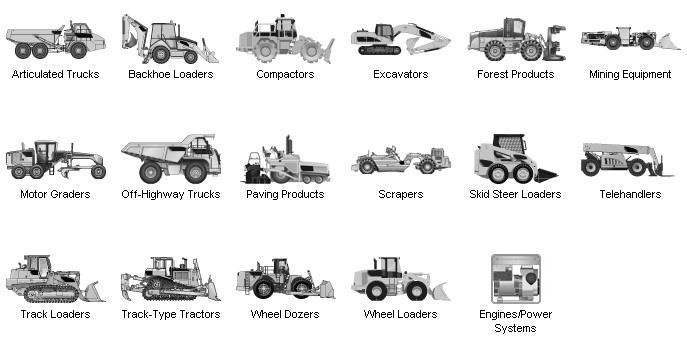
Support car list of CAT Caterpillar ET Diagnostic Tool :
26-6


With the CAT Diagnostic Tool, you can:
View active and logged diagnostics
View events where irregularities occurred and were logged by the ECM
View the status of a group of parameters (temperatures, pressures, etc.) simultaneously
Record and log performance data
Graph a group of status parameters
View the current configuration of an ECM
Change ECM configurations
Perform diagnostic tests
Perform calibrations
Print reports and diagnostic results
For some machine and engine products, additional functionality has been included with the service tool program

Features
Display, graph and log status parameters.
Retrieve prognostic data including histograms, engine totals for fuel used and miles traveled.
View active diagnostics and clear logged diagnostics. View events where irregularities have occurred and have been logged by the ECM.
Perform calibrations to enhance performance of the ECM.
Customize the ECM with application-specific settings.
Over 100 custom Diagnostic, Information and Service features including:
– 2D and 3D Histogram plotting capability (engine software
support required).
– Custom Status screen groups
– Snapshots (Download and display snapshot data recorded by the
ECM)
– Configuration Aid that allows upload/download of same
configuration to multiple control modules

Customised Service Tool Options
Customized service tool name
Customized graphics for the splash screen and icons
Customized installation
Aftermarket differentiation, i.e., the tool for one customer does not work on the product of another customer.
Licensing options for customer management
Flash programming of the ECM(s)
Training demonstration allows familiarity with the tool’s primary functions without connecting to ECM(s)

Perform customized diagnostic tests to identify harness problems, cylinder or component failures (Automatic Cylinder Cutout with cylinder to cylinder fueling comparison)

Caterpillar electronic technician 2020B with WinFlash future is an updated version of the caterpillar dealer diagnostic software that can help technicians to diagnose existing and potential problems with their electronically controlled Caterpillar Engines and Machines.

To get the vehicle information the Cat ET software must be connected to the Electronic Control Module (ECM). For this purpose, you need a suitable diagnostic link adapter (DLA), for instance, Genuine CAT Comm Adapter III

The list of supported CAT machines and engines can be found below(if your vehicle is missing, please contact us we will double check):
Engines:
Electric Power
Electric Power Generation
Industrial
Marine Power Systems
Oil and Gas

Machines:
Articulated Trucks
Asphalt Pavers
Backhoe Loaders
Cold Planers
Compactors
Dozers
Drills
Excavators
Feller Bunchers
Forest Machines
Forwarders
Harvesters
Hydraulic Mining Shovels
Knuckleboom Loaders
Material Handlers
Motor Graders
Off-Highway Trucks
Pipelayers
Road Reclaimers
Site Prep Tractors
Skid Steer and Compact Track Loaders
Skidders
Telehandlers
Track Loaders
Underground – Hard Rock
Underground – Longwall
Underground – Room and Pillar
Utility Vehicles
Wheel Dozers
Wheel Excavators
Wheel Loaders
Wheel Tractor-Scrapers
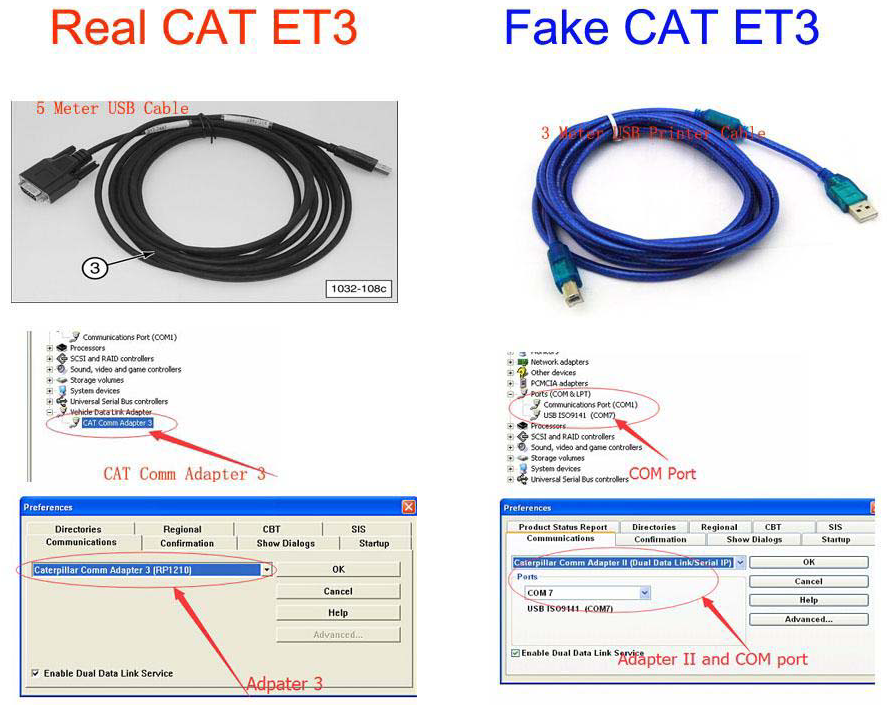
Original Factory Caterpillar ET3 Adapter III Compare With OEM Caterpillar ET Diagnostic Adpater III

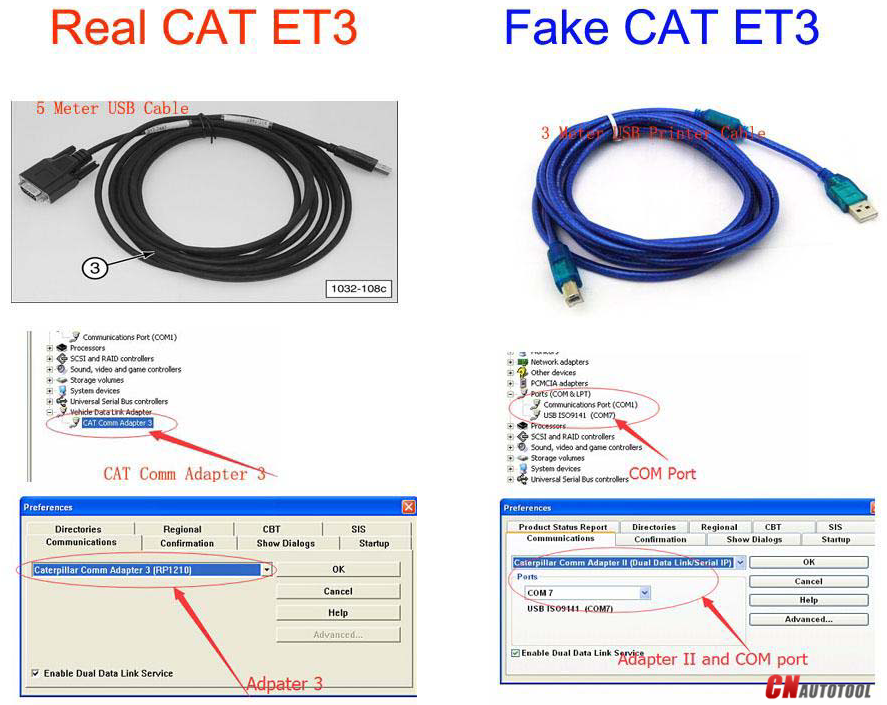
1. Original Factory CAT ET can use once pluged, no need install the USB drive, the software can automatic realize it for ET3 Adapter, and the machine can automatic weld the high quality Circuit board, quality will be more reliable.
2. The OEM Caterpillar ET Diagnostic Adapter III need use USB Drive to install, and need choose the COM Port, and  in the software ET also need choose ET2 then can be used.

The Details as follows:
cat-1


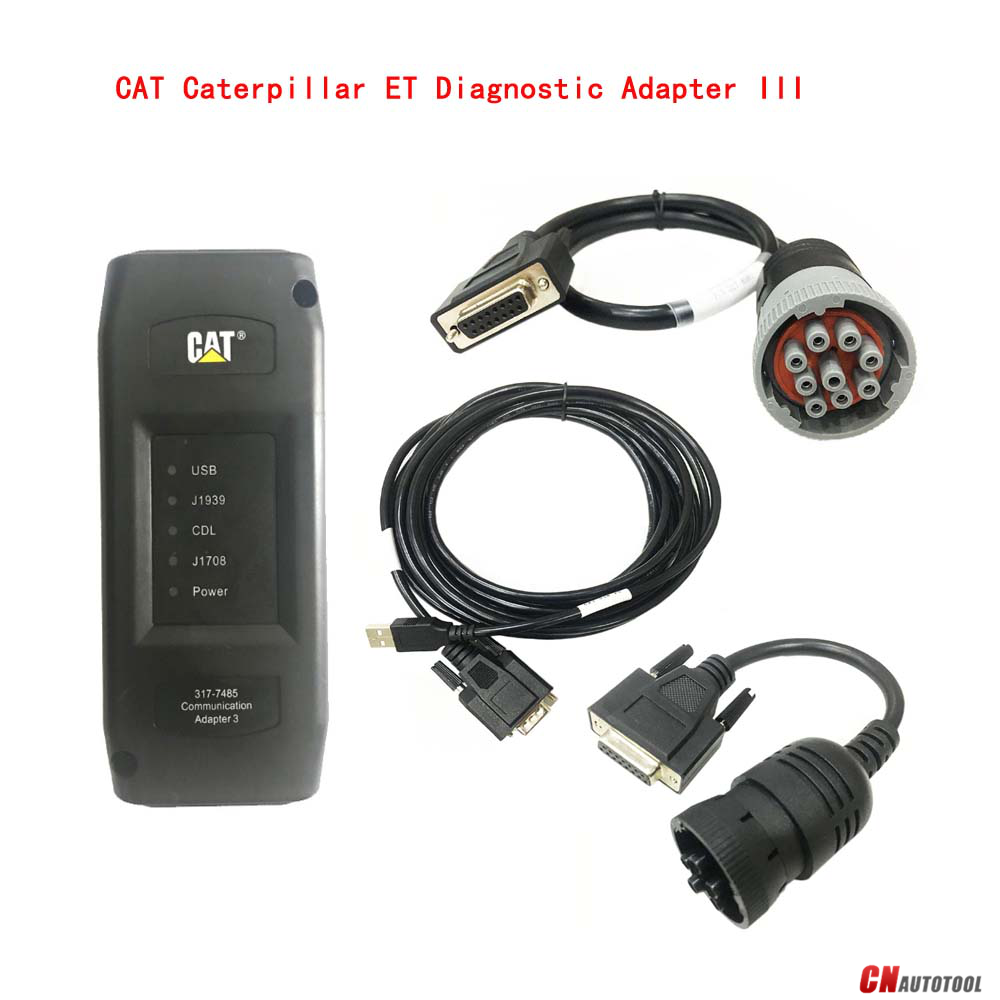
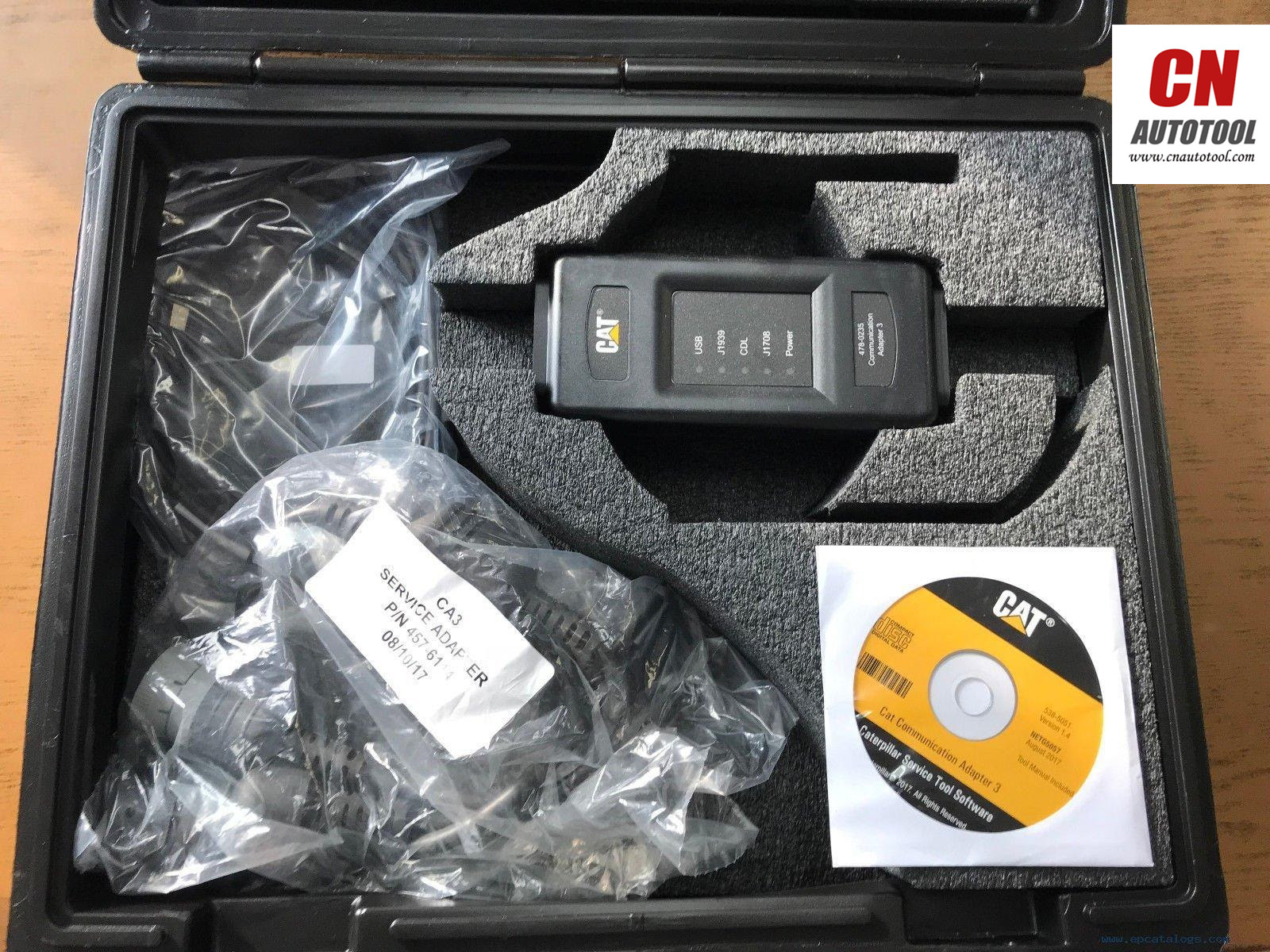
Package :
1.Used Dell D630 laptop
2.Real CAT et3 Comm Adapter III(it’s best quality cat et 3,not adapter 2,please check Communication port)
3.USB Cable (From device to your computer)
4.J1939/J1708 9PIN Cable (from device to your truck)
5.6PIN Cable (for old truck)
6.14PIN Cable(for new truck)
7.Plastic box
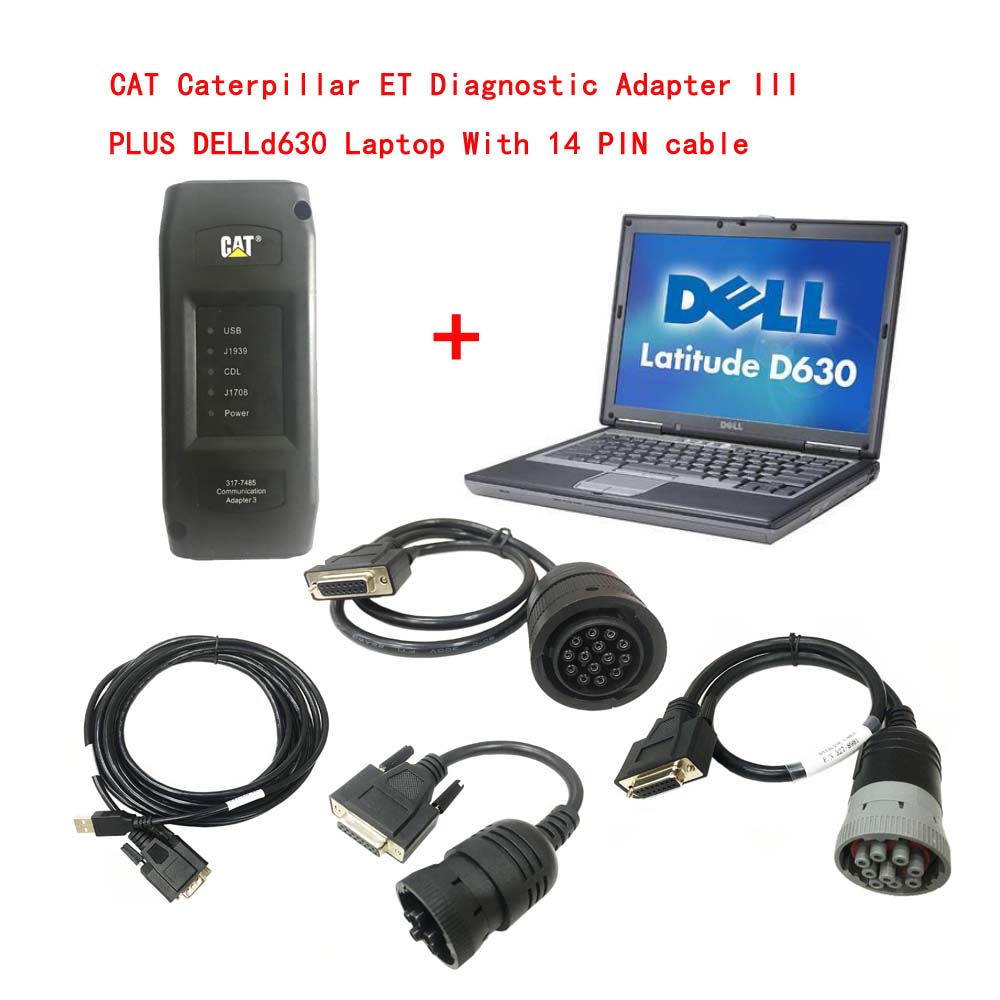
Cat ET 3


If you have any request , please check our website www.cnautotool.com , and you can make the order online directly , or you can send email to us sale@cnautotool.com

Related posts:

2021年6月5日星期六

Newest software!CAT Caterpillar ET Diagnostic Adapter III


Cat et Caterpillar Electronic Technician Software:
Brand: Caterpillar
Region: WorldWide
Support Multi-language:English, Chinese, Danish, French, German, Italian, Japanese, Portuguese, Russian, Spanish
Support All cars of CAT

2021A is an upgraded version of 2020C , A represents the first quarter, and C is the software updated in the third quarter.

2021A Cat ET software as Cat Caterpillar ET 2018C 2019A 2019C 2020C Software update version, 2021A Caterpillar Electronic Technician software With CAT ET 3 Cat caterpillar adapter 3 support caterpillar diagnostic till 2021.

2020C Cat ET software


CAT Caterpillar ET Diagnostic Tool  Product Description :
CAT Caterpillar ET Diagnostic Tool from Caterpillar provide the capability to access Electronic Control Modules (ECMs) from a personal computer. Many job-critical tasks can be performed with an electronic service tool. The user can display the status of a group of parameters (temperatures, pressures, etc.) simultaneously, view active and clear logged diagnostics, display the current configuration of an ECM and much more. The service tool works with a communication adapter to allow connection to an ECM. A graphical interface makes this software quick to learn and easy to use. A separate pull-down menu for each function enhances the “ease of use.” The version and identification of the ECM is automatically retrieved and is displayed on a summary screen when the program is started. Diagnostic tests and calibrations can also be performed.

CAT Caterpillar ET Diagnostic Tool enable service technicians to reprogram ECMs, reconfigure control system parameters, fine tune performance or diagnose the root cause of a failure the first time. These powerful tools allow service personnel to display and analyze vital performance and health information from any system quickly and accurately. The service tool communicates with any system using ATA (J1708), J1939 or the Caterpillar proprietary data link networks. The service tools provide information and features needed to help a technician diagnose problems and perform repairs and to customize and personalize the operation of a product. By allowing customers to design flexibility and configurability into a product, Caterpillar service tools stretch beyond the capabilities of preprogrammed ECMs or onboard display systems.

Support car list of CAT Caterpillar ET Diagnostic Tool :

cat0

Professional Diagnostic Tools Diagnostic Software Caterpillar ET 2020A (replaces CAT ET 2019C, 2018A) Electronic Technician Diagnostic Software
Type of catalogue:Diagnostic Software
Make:caterpillar
Region:WorldWide
languages:English

What’s New – 2020A
Product Status Report Updates
The Product Status Report has been updated to include throttle configuration information.
Caterpillar ET Software 2019C Function:
This diagnostic app allows you to:
View active and logged diagnostics.
View events where irregularities occurred and were logged by the ECM.
View the status of a group of parameters (temperatures, pressures, etc.) simultaneously.
Record and log performance data.
Graph a group of status parameters.
View the current configuration of an ECM.
Change ECM configurations.
Perform diagnostic tests.
Perform calibrations.
Print reports and diagnostic results.
Please keep in mind that some ecm settings for example, speed limit requires factory password. The factory password generator is not included in this application

What’s New – 2021A
No significant new features or feature enhancements

What’s New – 2020C
No significant new features or feature enhancements

What’s New – 2020B
Trainer Update – 299D3
The 299D3 Skid Steer Loader has been added to the Trainer application.

What’s New – 2020A
Product Status Report Updates
The Product Status Report has been updated to include throttle configuration information.
Built-in Factory Password Generator
The experimental feature allows you to decode (18-Bit passwords not supported) factory passwords

What’s New
What’s New – 2019C
Indication of Selected Communications Adapter

The service tool now displays the selected communications adapter when the service tool is disconnected. The adapter name is displayed in the status area at the bottom right of the service tool window.

End of Support for Windows 7

Microsoft is ending extended support for Windows 7 as of January 2020. The service tool will be ending support for Windows 7 as of the 2020A release.

What’s New – 2019B
Automatic Product Status Report (PSR) Upload

The service tool includes a new tool that automatically uploads Product Status Reports. The tool scans for newly generated Product Status Reports and uploads them when an internet connection is available. The default is that automatic report uploading is enabled. The Preferences dialog has an option to disable the tool.

What’s New – 2019A
ECM Naming Changes
Certain ECMs connect to the service tool over two data links at the same time. The service tool shows a message popup when the ECM is only detected on one link. The service tool has been changed to add the text **INCOMPLETE** in the ECM name when the connection is incomplete. Service tool features that display a connection icon also use a new icon for an incomplete connection.

What’s New – 2018C
No significant new features or feature enhancements

What’s New – 2018B
CEOS Fleet Configuration File TOP
A CEOS (Customer Electronic Option Selection) Fleet Configuration File can be created/modified for an engine using the Service Tool. This is available in connected and disconnected mode.
Error When Launching Service Tool
There is a Microsoft issue with upgrading libraries during an installation involving certain versions of the C++ redistributable. After a successful service tool installation, when trying to run the service tool for the first time, one of the following errors may occasionally appear: “The entry point could not be located in api-ms-win-crt-runtime” or “The program can’t start because mfc140u.dll is missing from your computer.” If either of these messages is displayed, please let us know and we will send you to step by step troubleshooting guide. This procedure requires administrator rights.
Service Tool License Corruption Issues with Windows 10 Updates
Windows 10 updates 1709 and 1803 will corrupt service tool licenses. Future Window 10 updates may do the same
If either of license error messages is displayed, please let us know and we will send you to step by step troubleshooting guide.

What’s New – 2018A
What’s New 2018A
Trainer Update – 988K XE Wheel Loader
The 988K XE Wheel Loader has been added to the Trainer application.

What’s New – 2017C
Preferences Option to Save a Product Status Report to PDF
The Preferences dialog for the Product Status Report has changed. The dialog contains a new checkbox to automatically save a Product Status Report as a PDF file when the report is created. The service tool will continue to automatically save Product Status Reports as an XML file.

What’s New – 2017B
Product Status Report Updates
The Product Status Report has been updated to include certain history features supported by the ECM, such as the after-treatment Regeneration History and the Service Test History.
Winflash Screen Update
The screen for the Winflash feature has been updated. A new Expand All button opens all sections of the screen to show all details for ECMs detected by WinFlash. A new Collapse All button hides all sections of the screen, except for header rows showing detected ECM names.

PC, Communication Hardware, and Cable Requirements
To run the service tool, the next PC, communication hardware, and cable requirements must be met. NOTE: The minimum PC Configurations should not be used as a standard when buying new personal computers for service tool purposes. If the existing equipment meets these minimum requirements, it will run the service tool.

PC Requirements
Recommended Configurations
PC containing a 2.0 GHz dual-core processor
3GB RAM
3GB of the available hard disk drive
DVD-ROM drive (optionally)
15.4-inch XGA Screen (1280×1024 compatible)
Microsoft Windows™ 7 Professional or Windows 8 Professional, Windows 10 Professional (Not tested with Home Edition) (Note: Windows 8 RT is not supported)
RS232 port with 16550AF UART or compatible (for use with Comm Adapter II)
USB 1.1 or 2.0 port (for use with Comm Adapter 3)
Ethernet RJ45 connector
Built-in pointing device or mouse
For security purposes, Microsoft Internet Explorer version 11 or newer or Microsoft Edge is recommended.
Note: The most recent version of Microsoft Internet Explorer may not be validated to work with the service tool.
Wi-Fi (for the Wireless Comm Adapter 3)

Minimum Configurations
PC containing a Pentium 2 GHz processor or greater
1GB RAM
500MB of an available hard disk drive
CD-ROM drive
Super VGA monitor or display (1024×768)
Microsoft Windows™ 7 Professional or Windows 8 Professional, Windows 10 Professional (Not tested with Home Edition) (Note: Windows 8 RT is not supported)
RS232 port with 16550AF UART or compatible (for use with Comm Adapter II)
USB 1.1 or 2.0 port (for use with Comm Adapter 3)
Ethernet RJ45 connector
Built-in pointing device or mouse
For security purposes, Microsoft Internet Explorer version 9 or newer is recommended. Note: The most recent version of Microsoft Internet Explorer may not be validated to work with the service tool.

Communication Hardware
Caterpillar Communication Adapter III
Configuring Cat Electronic Technician to use the Communication Adapter 3
For Cat Electronic Technician to work with the Communication Adapter 3, the settings must be changed to select the Communication Adapter 3 as the Communication Interface Device:
Step 1 Start Cat Electronic Technician.
Step 2 Click the Stop Connect button when it appears.
Step 3 Select the Utilities menu.
Step 4 Choose “Preferences > Modify…”.
Step 5 Select the Communications tab.
Step 6 Select Cat Comm Adapter 3 (RP1210) and click OK.
NOTE: Because a growing number of products require multiple data link service, the “Enable Dual Datalink Service” checkbox has been pre-selected.
Servicing ECMs on more than one data link requires this check box to be enabled.
Failure to do this will result in undetected ECMs and reduced functionality.

Package :
1.Used Dell D630 laptop
2.Real CAT et3 Comm Adapter III(it’s best quality cat et 3,not adapter 2,please check Communication port)
3.USB Cable (From device to your computer)
4.J1939/J1708 9PIN Cable (from device to your truck)
5.6PIN Cable (for old truck)
6.14PIN Cable(for new truck)
7.Plastic box

13-1


2020年12月29日星期二

Latest Version CAT Caterpillar ET Diagnostic Adapter III


CAT Caterpillar ET Diagnostic Adapter III retrieve engine totals for fuel used, miles traveled, and hours Operated. CAT Caterpillar ET Diagnostic Adapter display status of all parameters, such as engine speed, Throttle position, timing advance, fuel flow, etc.

cat

Caterpillar ET 2019C (replaces CAT ET 2018b, 2019A,2019B) Electronic Technician Diagnostic Software :
Brand: Caterpillar
Region: WorldWide
Support Multi-languages:English, Chinese, Danish, French, German, Italian, Japanese, Portuguese, Russian, Spanish
Compatible OS: Windows 7 32 bit, Windows 7 64 bit, Windows 8/8.1 32 bit, Windows 8/8.1 64 bit, Windows 10 32 bit, Windows 10 64 bit
Publication date: 10.2019 year
Support All cars of CAT

The PC-based service tools from Caterpillar III provide the capability to access Electronic Control Modules (ECMs) from a personal computer. Many job-critical tasks can be performed with an electronic service tool. The user can display the status of a group of parameters (temperatures, pressures, etc.) simultaneously, view active and clear logged diagnostics, display the current configuration of an ECM and much more. The service tool works with a communication adapter to allow connection to an ECM. A graphical interface makes this software quick to learn and easy to use. A separate pull-down menu for each function enhances the “ease of use.” The version and identification of the ECM is automatically retrieved and is displayed on a summary screen when the program is started. Diagnostic tests and calibrations can also be performed.

CAT Caterpillar ET Diagnostic Tool enable service technicians to reprogram ECMs, reconfigure control system parameters, fine tune performance or diagnose the root cause of a failure the first time. These powerful tools allow service personnel to display and analyze vital performance and health information from any system quickly and accurately. The service tool communicates with any system using ATA (J1708), J1939 or the Caterpillar proprietary data link networks. The service tools provide information and features needed to help a technician diagnose problems and perform repairs and to customize and personalize the operation of a product. By allowing customers to design flexibility and configurability into a product, Caterpillar service tools stretch beyond the capabilities of preprogrammed ECMs or onboard display systems.

Support car list of CAT Caterpillar ET Diagnostic Tool :

cat0


With the CAT Diagnostic Tool, you can:
View active and logged diagnostics
View events where irregularities occurred and were logged by the ECM
View the status of a group of parameters (temperatures, pressures, etc.) simultaneously
Record and log performance data
Graph a group of status parameters
View the current configuration of an ECM
Change ECM configurations
Perform diagnostic tests
Perform calibrations
Print reports and diagnostic results
For some machine and engine products, additional functionality has been included with the service tool program

Features
Display, graph and log status parameters.
Retrieve prognostic data including histograms, engine totals for fuel used and miles traveled.
View active diagnostics and clear logged diagnostics. View events where irregularities have occurred and have been logged by the ECM.
Perform calibrations to enhance performance of the ECM.
Customize the ECM with application-specific settings.
Over 100 custom Diagnostic, Information and Service features including:
– 2D and 3D Histogram plotting capability (engine software
support required).
– Custom Status screen groups
– Snapshots (Download and display snapshot data recorded by the
ECM)
– Configuration Aid that allows upload/download of same
configuration to multiple control modules

Customised Service Tool Options
Customized service tool name
Customized graphics for the splash screen and icons
Customized installation
Aftermarket differentiation, i.e., the tool for one customer does not work on the product of another customer.
Licensing options for customer management
Flash programming of the ECM(s)
Training demonstration allows familiarity with the tool’s primary functions without connecting to ECM(s)
Perform customized diagnostic tests to identify harness problems, cylinder or component failures (Automatic Cylinder Cutout with cylinder to cylinder fueling comparison)

13-1

All the details about the Cat Caterpillar ET Diagnostic Adpater III ,please feel free to contact with us: www.cnautotool.com

2020年11月21日星期六

CAT Caterpillar ET Diagnostic Software three benefits


CAT Caterpillar ET Diagnostic Adapter is PC-based diagnostic device for CAT Large Cars and Engines. CAT ET 2020A helpprovider experts to reprogram ECMs, reconfigure control program parameters and so on. In advance of working with this CatConversation Scanner, you have to set up CAT Caterpillar ET Diagnostic Adapter USB Push.

CAT Caterpillar ET is multi languages Car diagnostic Interaction Scanner for trucks and weighty duty. Cat Conversationadapter ii allow to obtain Digital Command Modules (ECMs) from a personal laptop or computer.Cat et is Caterpillar Car or truck interaction Adapter, Caterpillar vehicles Diagnostic device. Caterpillar et application 2012B is on the market to multi-languge. Caterpillar et enable services professionals to reprogram ECMs, reconfigure management method parameters.

All in all, with this Caterpillar Diagnostic Tool you will discover three benefits:
1.Procedures ensuing in reduce device operating and maintenance costs.
two. Checks are offered like cylinder cutout and injector
3.Activation force to make dilemma finding easy.

3-4

CAT Caterpillar ET is PC-based auto diagnostic service tools from Caterpillar. Cat et communication scanner can access Electronic Control Modules (ECMs) from a personal computer.Do you know how to use Caterpillar Cat et Diagnostic Adapter? How to crack and install Caterpillar Cat et Diagnostic Adapter? Cat et is Caterpillar Vehicle communication Adapter, Caterpillar trucks Diagnostic tool. Caterpillar et software 2012B is available to multi-languge. Caterpillar et enable service technicians to reprogram ECMs, reconfigure control system parameters.

CAT ET Adapter II is the Caterpillar trucks diagnostic adapter that can access Electronic Control Modules (ECMs) from a personal computer. Caterpillar Diagnostic Tool enable service technicians to reprogram ECMs, reconfigure control system parameters, fine tune performance or diagnose the root cause of a failure the first time. while before using CAT ET Adapter, you have to license the program with a license key.

I appreciated that the status screen allows the viewing of real time parameters by either using a predefined group or creating a custom group. And can help dealer identify problems without visiting machine. I can perform all diagnostic and calibrations with it. It will not let you flash ecm’s. Functionalities show all operating conditions that cause high repair costs such as: over speeds, high temperatures, fuel consumption, transmission shift counts. This can provide awareness to change operator.

3-3

2020年11月19日星期四

Professional Diagnostic Tools products CAT Caterpillar ET


As a excellent Professional Diagnostic Tools products, CAT Caterpillar ET Diagnostic Adapter has a powerful function.it not only can Display “Logged Event Codes” to show engine over speeds,High temperatures, fuel consumption but also can view ECM’s current configuration and change user settings,perform diagnostic tests and calibrations, and calibrate.Electro-mechanical and electro-hydraulic components .

This is the only recommended communication device for CAT, and the only datalink device that will allow you to properly communicate with a CAT engine on dual datalinks. Context sensitive help leads operator through every task Cat ET can perform. Data Logger and Data Log Viewer allows recording of ECM signals for delayed troubleshooting capability.Cat “ET Trainer” is now included in ET Program. It allows Users to train and practice using Cat ET without a Communications adapter or Electronic Control Module (ECM).This is a free feature of Cat ET.

It is the latest generation of the CAT Communication Adapter group, and replaces the Caterpillar Tools This is the only recommended communication device for CAT, and the only datalink device that will allow you to properly communicate with a CAT engine on dual datalinks. This function is needed for some CAT ET (Electronic Technician) functions. The PC-based service tools from Caterpillar provide the capability to access Electronic Control Modules (ECMs) from a personal computer. Many job-critical tasks can be performed with an electronic service tool.

The user can display the status of a group of parameters (temperatures, pressures, etc.) simultaneously, view active and clear logged diagnostics, display the current configuration of an ECM and much more. The service tool works with a communication adapter to allow connection to an ECM. The version and identification of the ECM is automatically retrieved and is displayed on a summary screen when the program is started. Diagnostic tests and calibrations can also be performed.

Diagnostic Software Caterpillar ET 2020A (replaces CAT ET 2019C, 2018A) Electronic Technician Diagnostic Software
Type of catalogue:Diagnostic Software
Make:caterpillar
Region:WorldWide
languages:English

What’s New – 2020A
Product Status Report Updates
The Product Status Report has been updated to include throttle configuration information.

What’s New
What’s New – 2019C
Indication of Selected Communications Adapter

The service tool now displays the selected communications adapter when the service tool is disconnected. The adapter name is displayed in the status area at the bottom right of the service tool window.

End of Support for Windows 7

Microsoft is ending extended support for Windows 7 as of January 2020. The service tool will be ending support for Windows 7 as of the 2020A release.

What’s New – 2019B
Automatic Product Status Report (PSR) Upload

The service tool includes a new tool that automatically uploads Product Status Reports. The tool scans for newly generated Product Status Reports and uploads them when an internet connection is available. The default is that automatic report uploading is enabled. The Preferences dialog has an option to disable the tool.

What’s New – 2019A
ECM Naming Changes
Certain ECMs connect to the service tool over two data links at the same time. The service tool shows a message popup when the ECM is only detected on one link. The service tool has been changed to add the text **INCOMPLETE** in the ECM name when the connection is incomplete. Service tool features that display a connection icon also use a new icon for an incomplete connection.

What’s New – 2018C
No significant new features or feature enhancements

What’s New – 2018B
CEOS Fleet Configuration File TOP
A CEOS (Customer Electronic Option Selection) Fleet Configuration File can be created/modified for an engine using the Service Tool. This is available in connected and disconnected mode.
Error When Launching Service Tool
There is a Microsoft issue with upgrading libraries during an installation involving certain versions of the C++ redistributable. After a successful service tool installation, when trying to run the service tool for the first time, one of the following errors may occasionally appear: “The entry point could not be located in api-ms-win-crt-runtime” or “The program can’t start because mfc140u.dll is missing from your computer.” If either of these messages is displayed, please let us know and we will send you to step by step troubleshooting guide. This procedure requires administrator rights.
Service Tool License Corruption Issues with Windows 10 Updates
Windows 10 updates 1709 and 1803 will corrupt service tool licenses. Future Window 10 updates may do the same
If either of license error messages is displayed, please let us know and we will send you to step by step troubleshooting guide.

What’s New – 2018A
What’s New 2018A
Trainer Update – 988K XE Wheel Loader
The 988K XE Wheel Loader has been added to the Trainer application.

What’s New – 2017C
Preferences Option to Save a Product Status Report to PDF
The Preferences dialog for the Product Status Report has changed. The dialog contains a new checkbox to automatically save a Product Status Report as a PDF file when the report is created. The service tool will continue to automatically save Product Status Reports as an XML file.

What’s New – 2017B
Product Status Report Updates
The Product Status Report has been updated to include certain history features supported by the ECM, such as the after-treatment Regeneration History and the Service Test History.
Winflash Screen Update
The screen for the Winflash feature has been updated. A new Expand All button opens all sections of the screen to show all details for ECMs detected by WinFlash. A new Collapse All button hides all sections of the screen, except for header rows showing detected ECM names.

PC, Communication Hardware, and Cable Requirements
To run the service tool, the next PC, communication hardware, and cable requirements must be met. NOTE: The minimum PC Configurations should not be used as a standard when buying new personal computers for service tool purposes. If the existing equipment meets these minimum requirements, it will run the service tool.

PC Requirements
Recommended Configurations
PC containing a 2.0 GHz dual-core processor
3GB RAM
3GB of the available hard disk drive
DVD-ROM drive (optionally)
15.4-inch XGA Screen (1280×1024 compatible)
Microsoft Windows™ 7 Professional or Windows 8 Professional, Windows 10 Professional (Not tested with Home Edition) (Note: Windows 8 RT is not supported)
RS232 port with 16550AF UART or compatible (for use with Comm Adapter II)
USB 1.1 or 2.0 port (for use with Comm Adapter 3)
Ethernet RJ45 connector
Built-in pointing device or mouse
For security purposes, Microsoft Internet Explorer version 11 or newer or Microsoft Edge is recommended.
Note: The most recent version of Microsoft Internet Explorer may not be validated to work with the service tool.
Wi-Fi (for the Wireless Comm Adapter 3)

Minimum Configurations
PC containing a Pentium 2 GHz processor or greater
1GB RAM
500MB of an available hard disk drive
CD-ROM drive
Super VGA monitor or display (1024×768)
Microsoft Windows™ 7 Professional or Windows 8 Professional, Windows 10 Professional (Not tested with Home Edition) (Note: Windows 8 RT is not supported)
RS232 port with 16550AF UART or compatible (for use with Comm Adapter II)
USB 1.1 or 2.0 port (for use with Comm Adapter 3)
Ethernet RJ45 connector
Built-in pointing device or mouse
For security purposes, Microsoft Internet Explorer version 9 or newer is recommended. Note: The most recent version of Microsoft Internet Explorer may not be validated to work with the service tool.


More similar products can be found on www.cnautotool.com and any problem please feel free contact us.

2020年9月2日星期三

What can I do with CAT Caterpillar ET Diagnostic Tool?


CAT Caterpillar ET Diagnostic Adapter III Truck Diagnostic Tool

CAT Adapter III

Retrieve engine totally for fuel used, miles traveled, and hours operated.Display status of all parameters, such as engine speed, throttle position, timing advance, fuel flow, etc.View active and logged diagnostic codes to identify faulty sensors.

What can I do with one CAT Caterpillar ET Diagnostic Tool: CAT Communication Adapter III has to work with a computer, and we users can  display the status of a group of parameters (temperatures, pressures, etc.) details: 1.Display Logged Event Codes to show engine over speeds, High temperatures, fuel consumption, etc;

2.View ECM’s current configuration and change user settings;

3.Perform diagnostic tests and calibrations, and calibrate;

4.Electro-mechanical and electro-hydraulic components;

5.Context sensitive help leads operator through every task diagnostic tools Cat ET can perform

6.Data Logger and Data Log Viewer allows recording of ECM signals for delayed troubleshooting capability.

Caterpillar ET is available with the language I want:

The most important reason why I choose Professional Diagnostic Tools CAT Caterpillar ET Diagnostic Adapter III is that it is available with the language what I want, the language it supports includes: Danish, English, French, German, Italian, Japanese, Portuguese and Spanish

More Details please contact us:

https://www.cnautotool.com/goods-2485-2017A+Version+CAT+Caterpillar+ET+Diagnostic+Adapter+III.html

2020年4月15日星期三

Original Factory Caterpillar ET3 Adapter III Compare With OEM Caterpillar ET Diagnostic Adpater III

The Difference between Oiginal Factory CAT Caterpillar ET Diagnostic Adapter III Scanner and OEM Cat Caterpillar ET Diagnostic Adapter
CAT Caterpillar ET Diagnostic Tool  Product Description :
CAT Caterpillar ET Diagnostic Tool from Caterpillar provide the capability to access Electronic Control Modules (ECMs) from a personal computer. Many job-critical tasks can be performed with an electronic service tool. The user can display the status of a group of parameters (temperatures, pressures, etc.) simultaneously, view active and clear logged diagnostics, display the current configuration of an ECM and much more.
The service tool works with a communication adapter to allow connection to an ECM. A graphical interface makes this software quick to learn and easy to use. A separate pull-down menu for each function enhances the “ease of use.” The version and identification of the ECM is automatically retrieved and is displayed on a summary screen when the program is started. Diagnostic tests and calibrations can also be performed.
The difference between the caterpillar ET diagnostic Adapter III the main cable is the big different, the original factory Cat Caterpillar the cable is the COM port cable, and the OEM cat caterpillar Adapter III the cable is USB port cable. the belows photo are the two kind of cable for the Cat Caterpillar ET Diagnostic Adapter III:
11-1
As we all known the cat caterpillar ET Truck scanner can support for heavy duty trucks and can support Bulldozer, Wheel Loader, Excavator, Dump Truck, Grader these truck, but not all the truck scan support according to the car type and the year of car, now we sell both the original factory cat caterpillar ET adapter and OEM cat caterpillar ET diagnostic adapter III,you can check with our website CnAutotool.com about the Cat Caterpillar scanner.

How to connect the ECM by CAT Communication Adapter 3

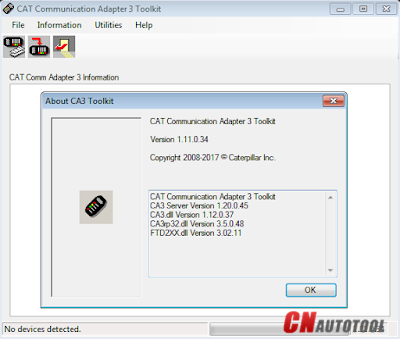
Test the Connection to the ECM Caterpillar Engines using CAT Communication Adapter 3 Toolkit
9-1
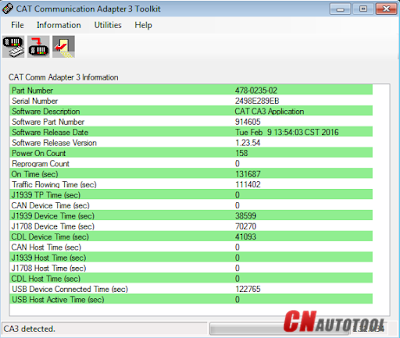
Use CAT Communication Adapter 3 Toolkit to test the connection between the CAT Communication Adapter 3 and the ECM Caterpillar Engines.
9-2
-Download Driver for CAT Comm Adapter 3 here:
CAT Comm Adapter 3 – v2.0
CAT Comm Adapter 3 – v4.4
Preparing to use the CAT Communication Adapter 3 Toolkit
1. Prepare your PC, and connect CAT Comm Adapter 3 to Diagnostic Port/Connector to the ECM.
2. Click “Start” – “All Programs” – “Caterpillar Comm Adapter 3” – “Comm Adapter 3 Toolkit”, or through shortcut “Comm Adapter 3 Toolkit” on desktop.
9-3
3. Once CA3 was detected, close the CAT Communication Adapter 3 Toolkit and open the CAT ET Software.
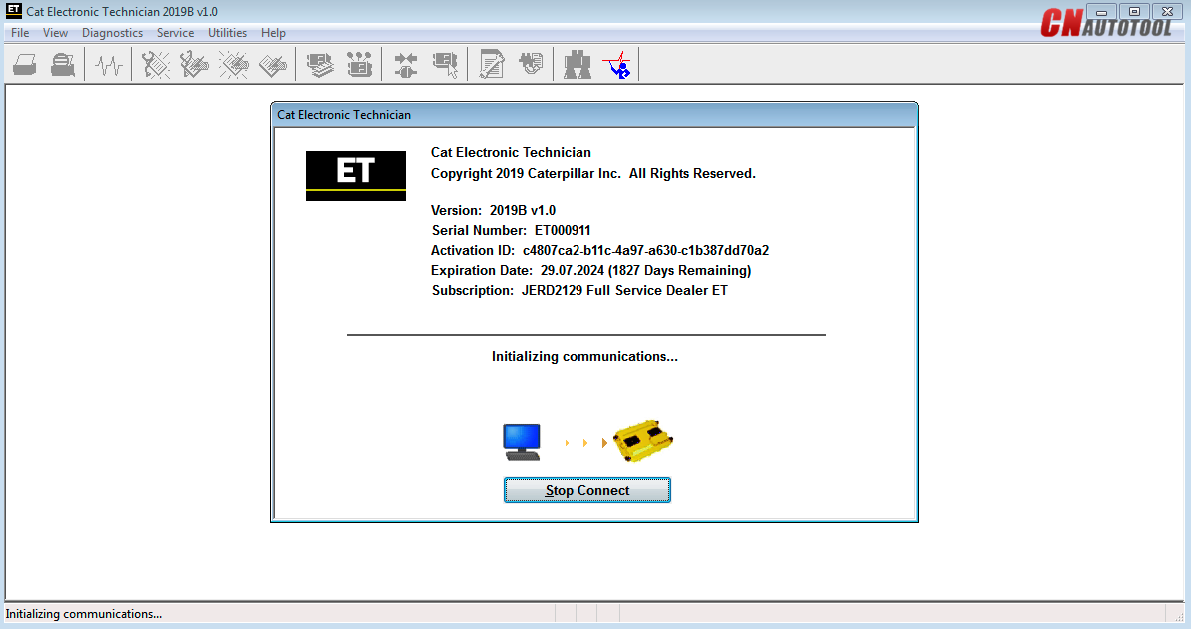
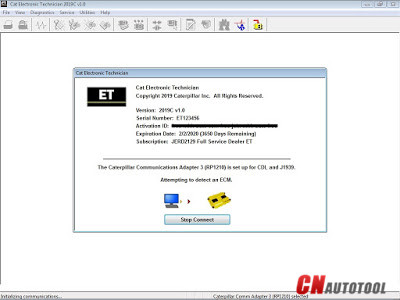
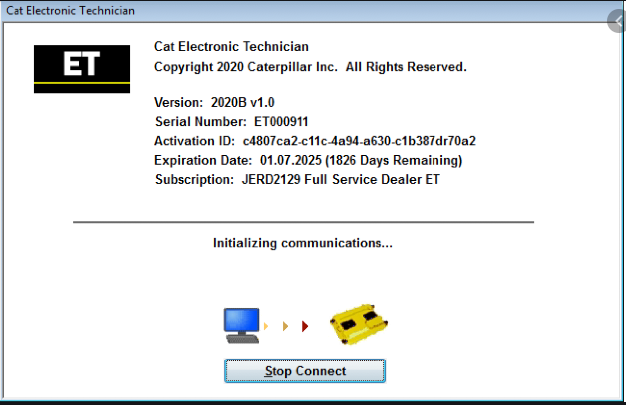
-The Connection message box is displayed while the service tool attempts to establish communications with the data link.
9-4
-To cancel all attempts to communicate with the ECM, click the “Stop Connect” button on the Connection message box. All functions that require an active data link connection are disabled. The service tool displays a blank main screen. The status bar is updated with the message “Disconnected.”
9-5
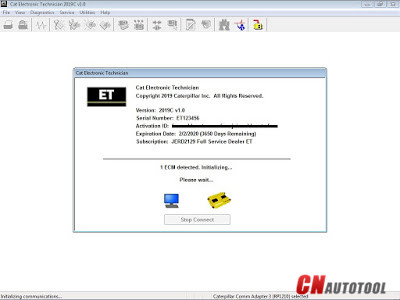
4. When communications are successfully established and a single ECM is found, the “ECM Summary” screen displays. When communications are successfully established and multiple ECMs are found, the ECM Selector dialog box displays. If the service tool connects to an ECM that is not supported by the subscription, the service tool displays a message and immediately disconnects.
9-6
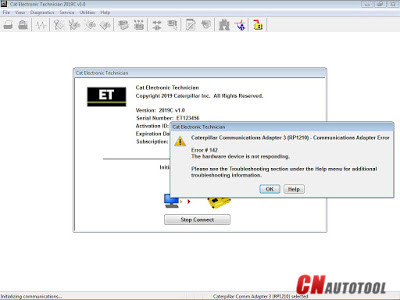
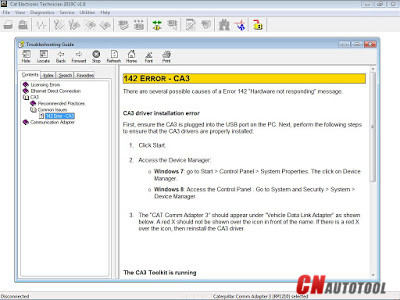
5. If any problems while trying to Initializing communications to the ECM, it will displays “Cat Electronic Technician” message to provides information for correcting the problems as example below.
9-7
9-8
Click “Help” button
Troubleshooting Guide

2018年12月17日星期一

2018A Version CAT Caterpillar ET Diagnostic Adapter III PLUS DELLd630 laptop

 2018A Cat ET software as Cat Caterpillar ET 2017A Software update version, 2018A Caterpillar Electronic Technician softwarer With CAT ET 3 Cat caterpillar adapter 3 support caterpillar diagnostic till 2018.

Cat et Caterpillar Electronic Technician Software 2018A V1.0:
Type of catalogue: Caterpillar Electronic Technician Diagnostic Software
Make: Caterpillar
Region: WorldWide all region
Inclusive languages: English, Chinese, Danish, French, German, Italian, Japanese, Portuguese, Russian, Spanish 


Caterpillar ET Software 2018A Function:
This diagnostic app allows you to:
View active and logged diagnostics.
View events where irregularities occurred and were logged by the ECM.
View the status of a group of parameters (temperatures, pressures, etc.) simultaneously.
Record and log performance data.
Graph a group of status parameters.
View the current configuration of an ECM.
Change ECM configurations.
Perform diagnostic tests.
Perform calibrations.
Print reports and diagnostic results.
Please keep in mind that some ecm settings for example, speed limit requires factory password. The factory password generator is not included in this application


2018A Cat ET software as Cat Caterpillar ET 2015A Software update version, 2018A Caterpillar Electronic Technician softwarer With CAT ET 3 Cat caterpillar adapter 3 support caterpillar diagnostic till 2018.