显示标签为“Consult-III Plus”的博文。显示所有博文

2021年3月6日星期六

The Nissan Consult 3 Plus Program Keyless Remote (T31C11K12)


This article show a guide on how to use Nissan Consult 3 Plus to program keyless remote (T31/C11/K12).Hope it helps,and if you want to know more about Nissan Consult 3 Plus,check:Nissan Consult 3 Plus Projects.

Related Contents:

Nissan Consult 3 Plus Software Download

How to Install Nissan Consult 3 III Plus Diagnostic Software

Procedures:

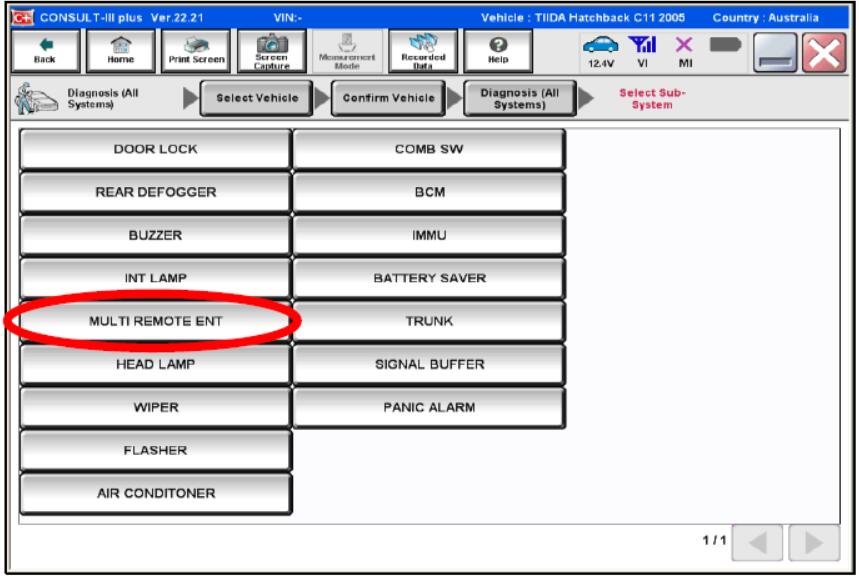
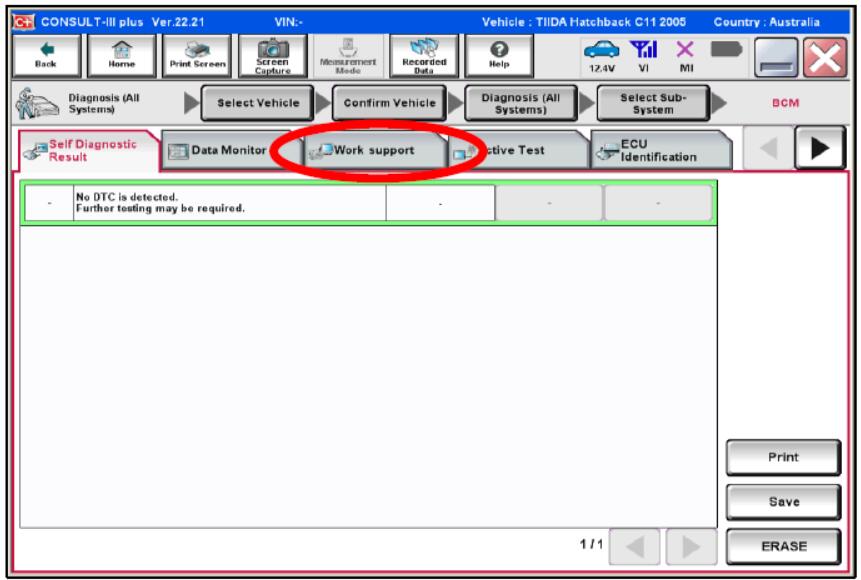
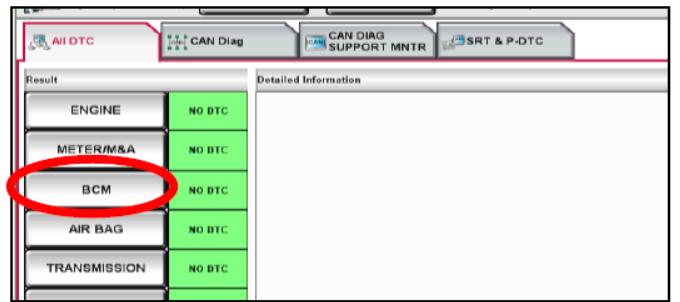
1.From the Nissan Diagnostic Tools CONSULT-III plus “All DTC” screen, select the “BCM”.

2.Select “MULTI REMOTE ENTRY”.

3.Select “Work Support”.

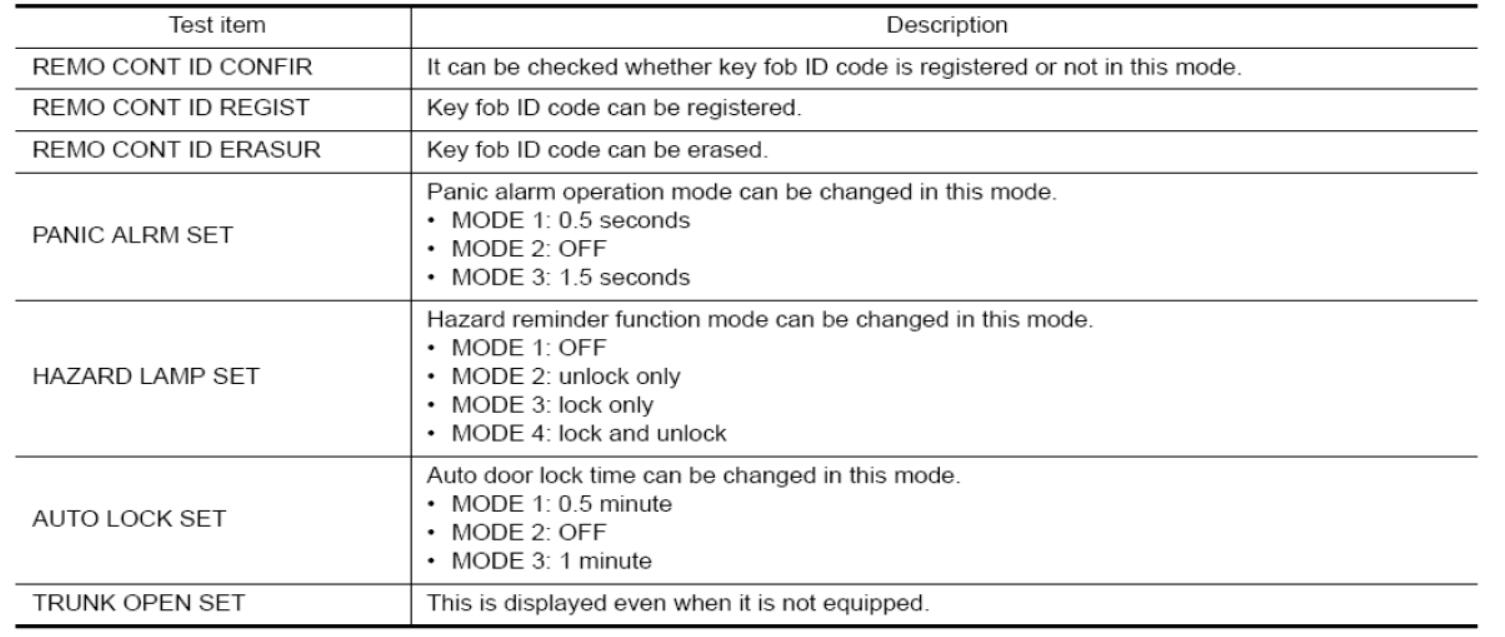
4.When the next screen appears, (section shown below) select “REMO CONT ID REGIST” function to program the remotes.

ID Code Entry Procedure

STEP 1

Close all doors (Observe the operation of the interior light with each door to ensure the door switches are OK).

STEP 2

Operate lock using the driver side door lock and unlock switch (on P/Window swassy.)

STEP 3

1.Remove and insert the key into the ignition key 6 times within 10 seconds (turning the key barrel switch from OFF to ON counts as 1 time).

2.Hazard warning lamp blinks and all door unlocks.

NOTE:On the sixth key insertion, keep the key in the cylinder with the key barrel switch ON.Does the hazard lamp blink and all doors unlock?YES >> GO TO STEP 4.NO >> GO TO STEP 1.

STEP 4

Within 3 seconds after the hazard lamp blinks and all door unlocks, turn ignition switch to the ACC position and operate lock using the driver side door lock and unlock switch.

STEP 5

1.Press the lock or unlock button of the keyfobto be added.
31-1
2.All doors unlock simultaneously.
31-2
3.Hazard warning lamp blinks and all door unlocks.
31-3
4.Key ID is registered.
31-4
Is key ID registered?

YES-1 >> When adding a keyfob: GO TO STEP 6.

YES-2 >> When ending registration: GO TO STEP 8.

NO >> GO TO STEP 1.

STEP 6

Operate lock using the driver side door lock and unlock switch.

STEP 7

1.Press the lock or unlock button of the keyfobto be added.

2.All doors unlock simultaneously.

3.Hazard warning lamp blinks and all door unlocks.

4.Key ID is registered.

Is key ID registered?
YES-1 >> When adding a keyfob: GO TO STEP 6.

YES-2 >> When ending registration: GO TO STEP 8.

NO >> GO TO STEP 6.

STEP 8

Open the all doors >> REGISTRATION END.


For more information about Nissan Professional Diagnostic Tool ,please visit our website sale@cnautotool.com


http://autotool.biz/2021/03/06/the-nissan-consult-3-plus-program-keyless-remote-t31c11k12/

2020年12月24日星期四

Nissan Consult 3 Plus NOT Connect to PC (customer solutions)


Leave a reply    

This is for those with a Nissan consult 3 plus interface not connected to the PC.

Usually when users power it up, only the red power led comes on and nothing more.

attach a photo…and help on how to resolve this problem, from mhhauto.com

Nissan Consult 3 Plus

Suggestion from experienced users:

1: close anti-virus program & disconnect internet connecton

Anti virus program oder firewall/auto protect activ

This software may disturb/block the vi- recognitoin routine of c3+.

in my case (using a passthru device) i disconnected the internet connection, deactivated the auto protect function and after starting c3+ again, the led became green….

I think to remember , you have to connect the original vi to the car and the laptop, both. Only connection to the laptop is not enough for c3+ to recognize the original vi.

2: check usb circuit on pcb and usb sockets on pc

If you have basic knowledge of checking the pcb and components internally, check the usb circuit etc. and have a try on another laptop to eliminate faulty usb sockets on pc

3: check wires, solder breaks, etc.

Use a multimeter and check for broken wires between obd plug and pcb , check for solder breaks on pcb where plugs and connections are soldered to, basic fault finding, check for pcb damage like scorch marks or discoloration and components for signs of stress or damage, use a high power magnifier.

4: check continuity

Then its a case of deeper fault finding using things like scope, function generator etc, check continuity with cable plugged into the interface in case one of the contacts is bad then follow connections as far as you can on pcb to check for breaks on the board.

2020年12月22日星期二

Consult-3 Plus for Nissan Nissan Diagnostic Tool Support Programming


You can select the package with HDD( software ) or not ,we already installed the nissan consult-3 plus software into 160G SATA interface laptop HDD, the HDD can be used after 2008 year SATA hard disk interface laptop

NOTE:

1. Support both diagnostic and programming, while if you want to make key programming, still need to buy Security Card for Nissan Consult 3 Plus

2. Support GT-R,if you need test GT-R,still need to buy Nissan consult-3 plus

Top 7 Reasons to Get Nissan Consult 3 Plus:
1. Support Nissan till year 20181.Consult-3 plus = Consult-3 for Nissan + Consult-2 for Nissan
2.Software Version: CSP Software Version : CSP V41.10; Programming Data Version : plus_V75
3.Supports all the models of the Nissan and Infiniti from 1996 to 2018, with all Consult II & III functions .
4.Calcaulate the password for the new cars till year 2018 with NISSAN Password.
5.Supports ECU Programming without card
6.Can be installed on Windows XP, WIN7 & WIN10Windows XP and Windows 7/8/10 operating system. Cannot work on VISTA O/S. ( Windows XP SP3,Windows 7 Pro/Ultimate  is also supported)
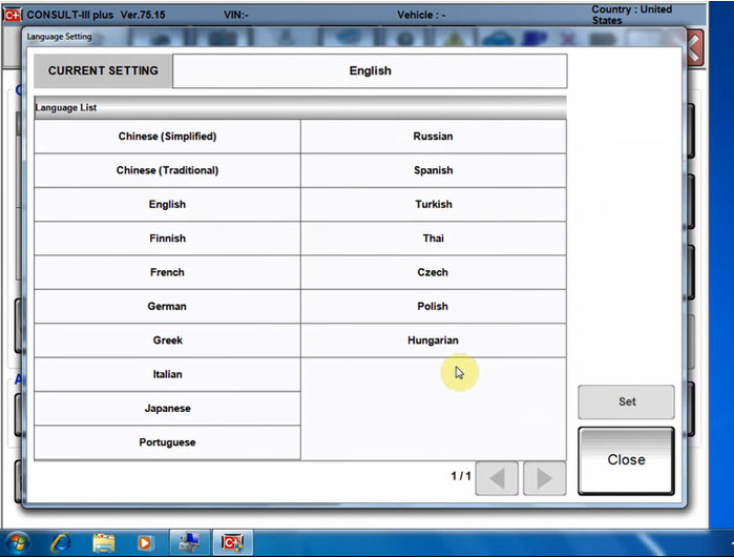
7.Suppored Languages: English, Chinese, Finnish, French, German, Greek, Italian, Japanese, Portuguese,Russian, Spanish, Turkish, Thai, Czech, Polish, Hungarian

2-1

Consult -3 Plus for Nissan Function:

Consult-3 Plus for Nissan can support all the models of the Nissan and Infiniti from 1996 up till now, with all Consult II & III functions .
And Consult III Plus can calcaulate the new 20 digital password for the Nissan new cars.

1. Consult-3 Plus for Nissan (Nissan Consult 3+) work for all nissan car , infiniti car and nissan gtr car to 2018.
2. Consult-3 Plus for Nissan work with obd-16 connector for the new kind of car, work with 14 pin connector for the old kind of car.
3. Consult-3 Plus for Nissan support nissan car electrolic system diagnostic function.
4. Consult-3 Plus for Nissansupport nissan electromobiles such as Leaf.Conslu-3 for Nissan Car List:

1. Scantool Diagnostics:for all Nissan,Infiniti,GTR
2. Immobi and Smart key:for all Nissan,Infiniti,GTR
3. Nissan GTR: for Nissan GTR Diagbostics and Immobi
4. Electromobiles car:for Nissan Electromobiles car Diagbostics and Immobi.For immobilizer key programming function, you need to purchase Nissan Conslut-3 Plus Security card together.

Nissan Consult3 Plus v75.20 software installation:
1.Uninstall the firewall, antivirus software.
2.Install the Consult 3 plus V75.20 to the C drive in the “NTFS” format.
3.Nissan Consult 3 Plus V65.12 & up adds ECU programming function without working with immobiliser card.

Consult-3 for Nissan Packing List:

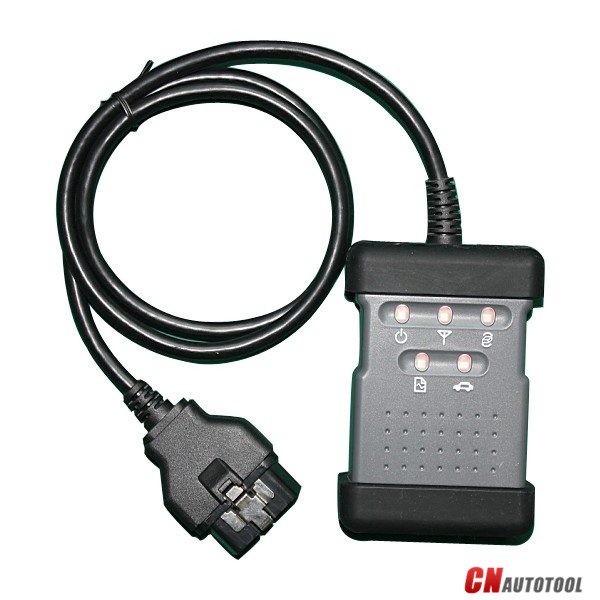
1pc* Consult 3 Plus for Nissan Vehicle Communication Module + OBD16 Cable
1pc* 14Pin Line for Nissan
1pc* USB 2.0 Cable
1pc* Bluetooth
1pc* Casebox
1pc* HDD 160G (option)
FAQ
Q1: What is the difference among Nissan consult 3, consult 4 and Nissan consult 3 plus? Can Nissan consult 4 remap ECU and change IGN time-limited parameter?Q1: What is the difference among Nissan consult 3, consult 4 and Nissan consult 3 plus? Can Nissan consult 4 remap ECU and change IGN time-limited parameter?
A1:
1) Nissan consult 3 and consult 4 share the same software version and parts, the difference between them is the appearance and the quality;
2) Nissan consult3 plus is the newest-released Nissan diagnostic  it supports the Nissan up to 2018 year. And only Nissan Consult 3 Plus can support programming.

Q2: What additional card needed when use Nissan Consult-3 plus to make key?
A2: It need additional card, it needs for making key, this card is Nissan Consult-3 plus Security Card, otherwise the button “Immobilizer key” is gray color and is unavailable

Q3: Can i use this nissan consult 3 plus to program tcm and bcm?
A2: Yes, but you need to have the program file.

Q4: Does your Nissan consult 3 plus contain Battery registration card?
A6: No, it doesn’t.

Q5: Do you have any instruction for software installation?
A7: Yes. There is the software installation video on our website. There is the software installation manual in the package too. You can follow them to install the software. Attention: Nissan consult software must be installed on XP system.

Q6: Can i use your nissan consult 3 to program tcm and bcm?
A8: This nissan consult 3 plus support this two function. But if you want to use this two function, you need have the programming file by yourself.

2020年9月27日星期日

How to set up Nissan consult 3 plus v75.20?


1. Support both diagnostic and programming, while if you want to make key programming, still need to buy Security Card for Nissan Consult 3 Plus  for Nissan Consult 3 Plus

2. Support GT-R,if you need test GT-R,still need to buy Nissan consult-3 plus GTR Card

Top 5 Reasons to Get Nissan Consult 3 Plus:

1.Consult-3 plus = Consult-3 for Nissan + Consult-2 for Nissan
2.Software Version: CSP Software Version : CSP V41.10; Programming Data Version : plus_V75
3.Supports all the models of the Nissan and Infiniti from 1996 to 2018, with all Consult II & III functions .
4.Calcaulate the password for the new cars till year 2018 with NISSAN Password.
5.Supports ECU Programming without card
6.Can be installed on Windows XP, WIN7
7.Suppored Languages: English, Chinese, Finnish, French, German, Greek, Italian, Japanese, Portuguese,Russian, Spanish, Turkish, Thai, Czech, Polish, Hungarian

31-1

How to set up Nissan consult 3 plus v75.20?

1.First read tips:

Uninstall the firewall, antivirus software.

anti-virus software can flag up Consult 3 plus software as having a virus. This is a false positive and is due to the software containing the application file like .exe. So Before setup the device software, please disable/uninstall anti-virus software or install a more reliable virus scanner!

2.Setup the Consult 3 plus V75.20 to the C drive in the “NTFS” format.

Here several pieces of simple guide to follow:

Open IE exploer browser to run “Start.html” .
Open folder “C30 License” to run “C3PCheckLicense.exe”.
Run “V80003T_20101215_x32.exe” to enable Bluetooth.
Open folder “ReprogramData” to run “pus_v65.1F.exe”.

Then, Nissan consult 3 plus v75.20 software will work greatly.


FAQ
Q1: What is the difference among Nissan consult 3, consult 4 and Nissan consult 3 plus? Can Nissan consult 4 remap ECU and change IGN time-limited parameter?
A1:
1) Nissan consult 3 and consult 4 share the same software version and parts, the difference between them is the appearance and the quality;
2) Nissan consult3 plus is the newest-released Nissan diagnostic  it supports the Nissan up to 2018 year. And only Nissan Consult 3 Plus can support programming.

Q2: What additional card needed when use Nissan Consult-3 plus to make key?
A2: It need additional card, it needs for making key, this card is Nissan Consult-3 plus Security Card, otherwise the button “Immobilizer key” is gray color and is unavailable

Q3: Can i use this nissan consult 3 plus to program tcm and bcm?
A2: Yes, but you need to have the program file.

Q4: Does your Nissan consult 3 plus contain Battery registration card?
A6: No, it doesn’t.

Q5: Do you have any instruction for software installation?
A7: Yes. There is the software installation video on our website. There is the software installation manual in the package too. You can follow them to install the software. Attention: Nissan consult software must be installed on XP system.