显示标签为“Cummins INLINE 7 DataLink Adapter”的博文。显示所有博文

2021年11月27日星期六

Cummins INLINE 7 Data Link Adapter Truck Diagnostic Tool

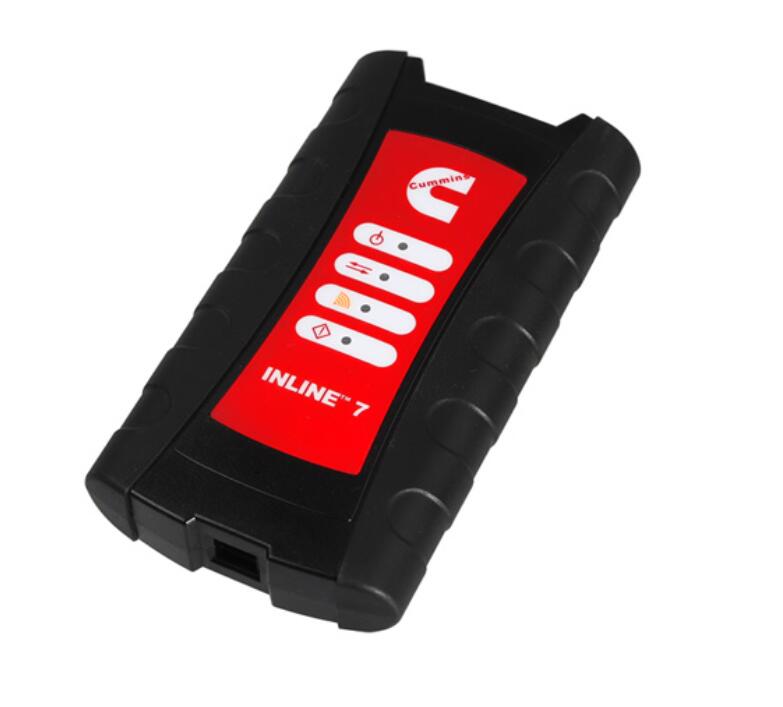
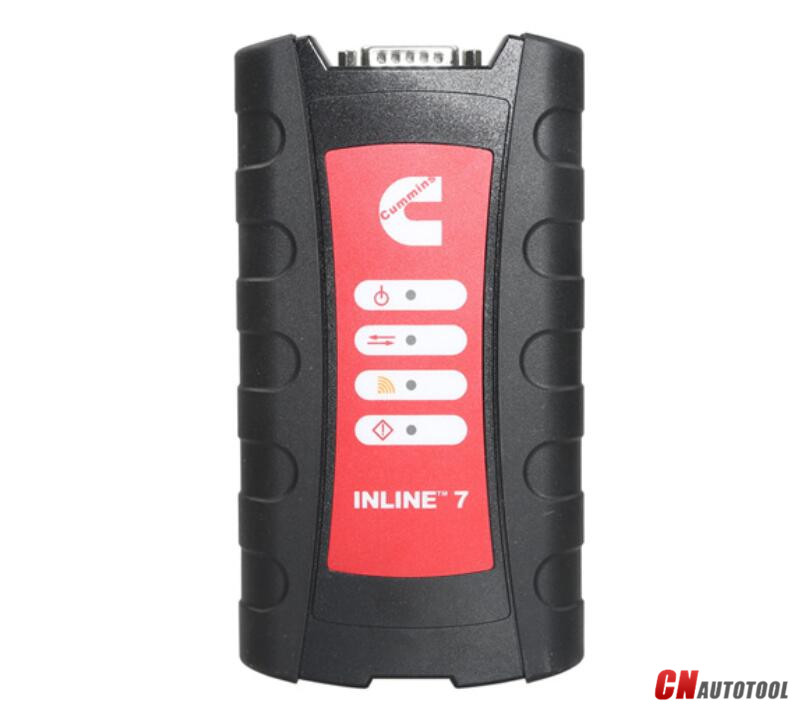
Cummins INLINE 7 Data Link Adapter-1

Cummins new INLINE 7 Data Link Adapter has a faster processor, more robust algorithms, larger memory buffers and more sophisticated filtering than previous models while simultaneously accessing multiple vehicle data channels.

Cummins new INLINE 7 Data Link Adapter has a faster processor, more robust algorithms, larger memory buffers and more sophisticated filtering than previous models while simultaneously accessing multiple vehicle data channels. INLINE 7 supports USB, WiFi and Bluetooth technologies in a single device. INLINE 7 communicates with your PC and is designed for future capability with mobile products.

The Cummins INLINE 7 Data Link Adapter is designed to function with a wide array of Cummins, OEM and third-party service and information tools, including the following:

Cummins INSITE
Cummins PowerSpec
Detroit Diesel Diagnostic Link
CAT Electronic Technician (On-Highway only)
Navistar® -ServiceMaxx Fleet Pro
Volvo PTT
VCAD Elite Mack/Volvo
V-Mac Service Tools
Allison DOC® For PC Service Tool
Allison DOC® for Fleets (1000/2000/3000/4000)
Eaton ServiceRanger
Bendix ACom
WABCO Toolbox
Freightliner ServiceLink
International DLB, Intune, and IPC v2.02
International ServiceMaxx
PF-Diagnosis
and many more!

The Cummins INLINE 7 data link adapter communicates with your PC using a Universal Serial Bus (USB) through a standard USB connector as well as through WiFi or Bluetooth. INLINE 7 is fully compliant with the Technology and Maintenance Council’s RP1210 standard and supports three simultaneous CAN connections and offers baud rates of 250k, 500k and 1 megabaud. INLINE 7 supports several other protocols such as J1708, J1587, ISO 15765, ISO 9141 (K and L line).

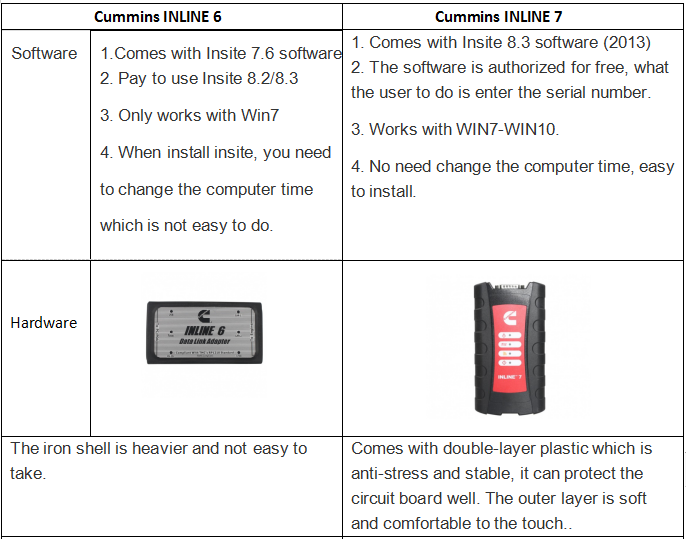
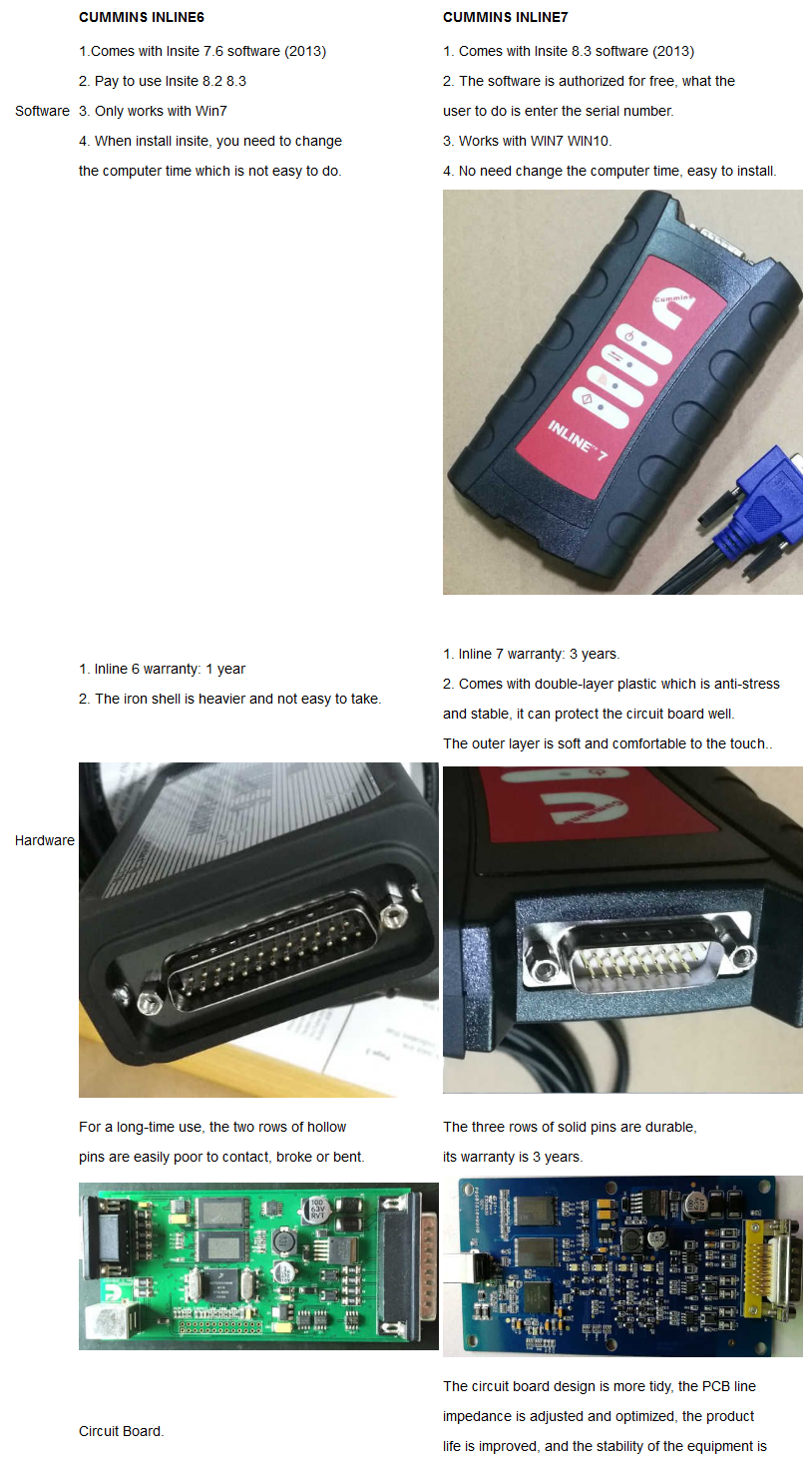
Cummins Inline 7 Data Link Adatper VS. Cummins Inline 6:
21-1

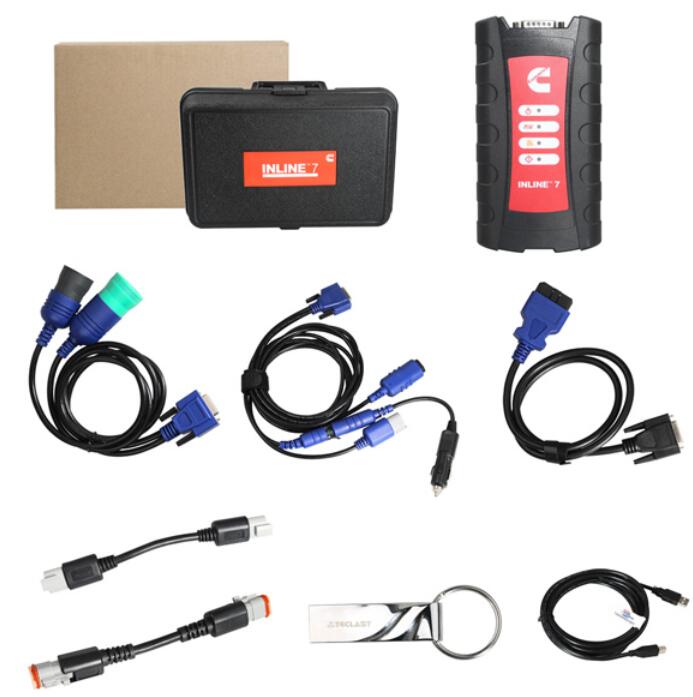
 Cummins INLINE 7 Package List:
1pc x Cummins INLINE 7 Data Link Adapter
1pc x DB26Pln-OBDll Cable
1pc x USB Cable
1pc x DB26/2Pin/3Pin Cable
1pc x DB26/9Pin Data Link Cable
1pc x 3Pin Connector
1pc x Software
1-2


If you have any problem, please do not hesitate to contact us with sale@cnautotool.com.

2021年8月22日星期日

The good Useful Cummins INLINE 7 Data Link Adapter

 Please pay attention :

In order to make cummins hardware work more stable , we still used Cummins inline 6 hardware driver , but use the cummins inline 7 diagnostic software , the functions the same .


1.Hardware: Cummins INLINE 7 Data Link Adapter
2.Software: Cummins Insite 8.5
3.Update Method: update by CDs
4.Multi-language: English(united states)/ Chinese(simplified)/ Danish/ Dutch/ Finnish/ French/ German/ Italian/ Japanese/ Korean/ Norwegian/ Portuguese/ Russian/ Spanish/ Swedish/ Turkish
5.Suggest Operating System: Win7 32 Bit System
6.Connection Method: WIFI/ Bluetooth/ USB

New Cummins engine diagnostic tool Cummins INLINE 7 Data Link Adapter has a faster processor, more robust algorithms, larger memory buffers and more sophisticated filtering than previous models while simultaneously accessing multiple vehicle data channels. INLINE 7 supports USB, WiFi and Bluetooth technologies in a single device. INLINE 7 communicates with your PC and is designed for future capability with mobile products.

The Cummins INLINE 7 DataLink Adapter is designed to function with a wide array of Cummins, OEM and third-party service and information tools, including the following:
Cummins INSITE
Cummins PowerSpec
Detroit Diesel Diagnostic Link
CAT Electronic Technician (On-Highway only)
Navistar® -ServiceMaxx Fleet Pro
Volvo PTT
VCAD Elite Mack/Volvo
V-Mac Service Tools
Allison DOC® For PC Service Tool
Allison DOC® for Fleets (1000/2000/3000/4000)
Eaton ServiceRanger
Bendix ACom
WABCO Toolbox
Freightliner ServiceLink
International DLB, Intune, and IPC v2.02
International ServiceMaxx
PF-Diagnosis
and many more!

The Cummins INLINE 7 data link adapter communicates with your PC using a Universal Serial Bus (USB) through a standard USB connector as well as through WiFi or Bluetooth. INLINE 7 is fully compliant with the Technology and Maintenance Council’s RP1210 standard and supports three simultaneous CAN connections and offers baud rates of 250k, 500k and 1 megabaud.

Cummins INLINE 7 Supports several other protocols:
such as J1708, J1587, ISO 15765, ISO 9141 (K and L line)

 Cummins INLINE 7 Package List:
1pc x Cummins INLINE 7 Data Link Adapter
1pc x DB26Pln-OBDll Cable
1pc x USB Cable
1pc x DB26/2Pin/3Pin Cable
1pc x DB26/9Pin Data Link Cable
1pc x 3Pin Connector
1pc x Software  


2021年7月18日星期日

Cummins INLINE 7 Data Link Adapter Cummins Truck Diagnostic Tool with Cummins Insite 8.5 Software

 New Cummins engine diagnostic tool Cummins INLINE 7 Data Link Adapter has a faster processor, more robust algorithms, larger memory buffers and more sophisticated filtering than previous models while simultaneously accessing multiple vehicle data channels. INLINE 7 supports USB, WiFi and Bluetooth technologies in a single device. INLINE 7 communicates with your PC and is designed for future capability with mobile products.  

1.Hardware: Cummins INLINE 7 Data Link Adapter
2.Software: Cummins Insite 8.5
3.Update Method: update by CDs
4.Multi-language: English(united states)/ Chinese(simplified)/ Danish/ Dutch/ Finnish/ French/ German/ Italian/ Japanese/ Korean/ Norwegian/ Portuguese/ Russian/ Spanish/ Swedish/ Turkish
5.Suggest Operating System: Win7 32 Bit System
6.Connection Method: WIFI/ Bluetooth/ USB

Tips to activate & use Inline 7 Iniste 8.5 Software?
1. Inline7 runs the same driver as Inline6

2. Software activation is done via server. Need to confirm by server and it may take some time, after success, the software is combined with your computer.

3. Do not directly open the Inline 8.5 after installed, you need to go through the server software and use Inline 8.5.

4. After Inline 8.5 is authorized successfully, users can use 3 years for free for 70 times, generally the user is supposed to get authorization every month (that is within 3 years, after the times is used up, users can get authorization by themselves). After 3 years, you need to pay extra license.

5.After activation, users are not allowed to change laptop motherboard, RAM and CPU. If you change them, you have to submit the Inline 7 serial number to the seller for activation.

6. The Calibrations in the Inline 7 U disk can be used for 6 months only, after 6 months later you can search “Inline Calibrations” online and download to use.

7.If you install Chinese version insite 8.5, then you have to run “Cummins License Configuration tool” in Chinese; if you choose the other language to install insite 8.5, then run the “Cummins License Configuration tool” in English, because the dealer code is not the same.

Chinese dealer code: 010C
English dealer code: 086N

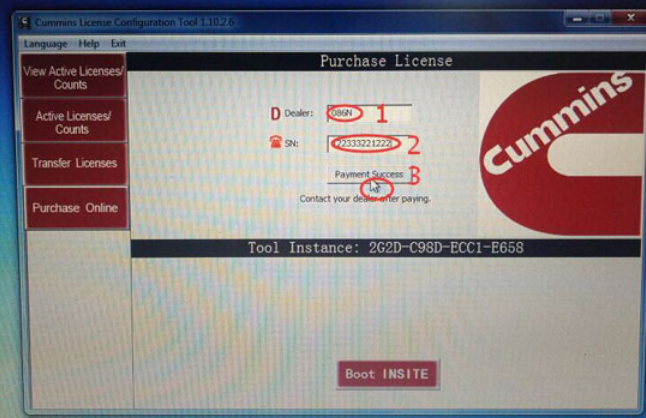
8.After input Dealer code and serial number, please click on ” Payment success”, then provide the dealer with the serial number for processing in the server. When it is done, click on ” Payment success” again and you will receive a message indicating success. 


If you have any problem, please do not hesitate to contact us with www.cnautotool.com.

2021年4月20日星期二

How to Solve Cummins INSITE Error

Some customer may have problem after use the Cummins INLINE 7 & Cummins INLINE 6 Data Link Adapter for months or years.
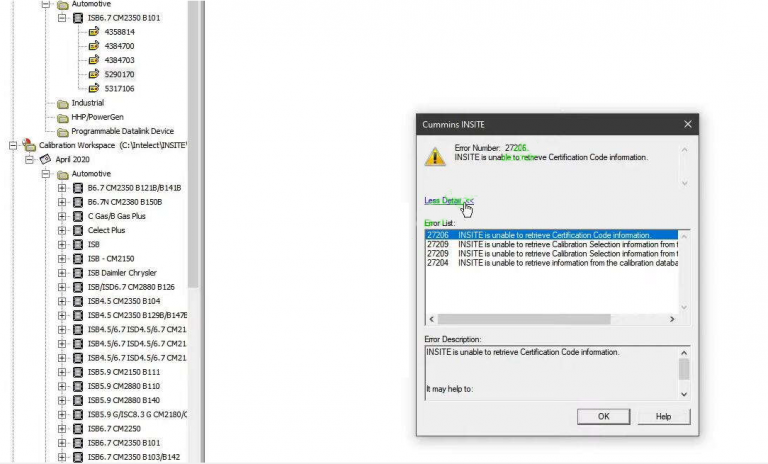
This is a solution post for Cummins INSITE error: INSITE is unable to retrieve Certification Code information.
31-1
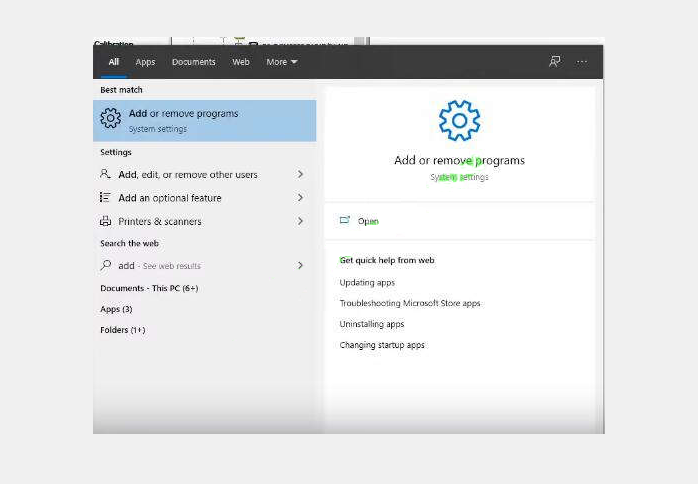
This problem need to reinstall software.
31-2
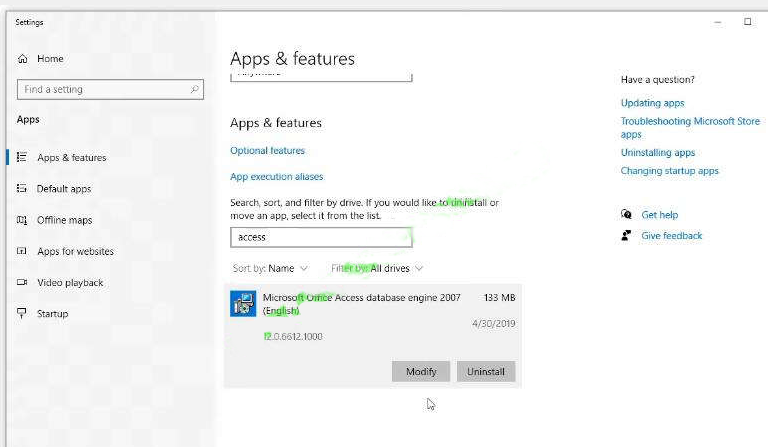
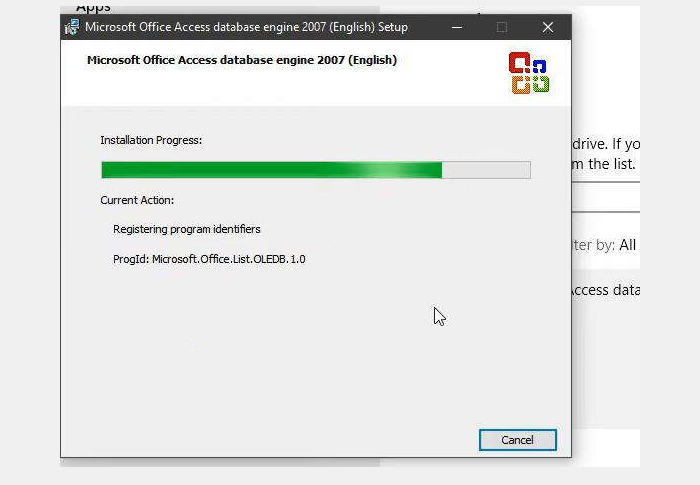
Then search “Microsoft Office Access database engine”. (If you do not have it, please just Google to search and install it.)
31-3
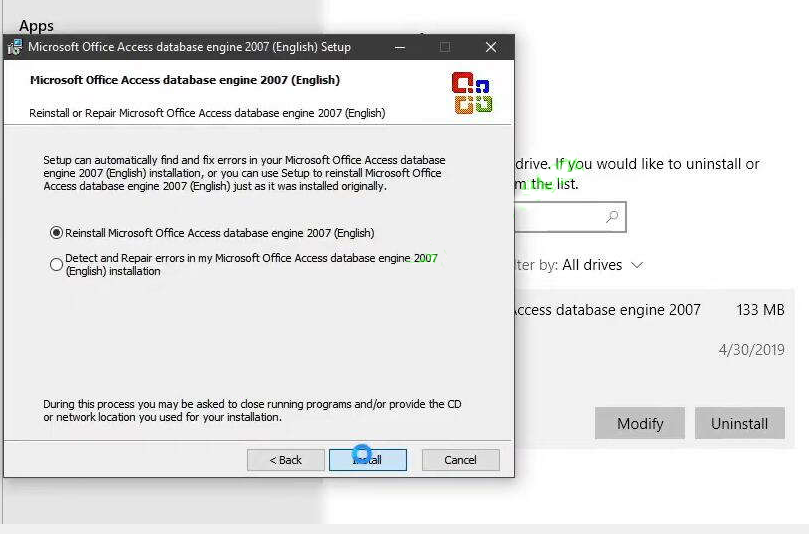
Click “Modify” butt to re-install it again
31-4
31-5

Then restart Cummins INSITE diagnostic software.
Now it can work correctly.
Any other problem, please contact us via Email:sale@cnautotool.com

2020年12月10日星期四

The Cummins Inline 7 datalink adapter


Cummins INLINE 7 Datalink Adapter

Cummins INLINE 7-1


The Cummins Inline 7 datalink adapter is a reliable adapter that can be used with many applications to communicate with various vehicle systems.  It is designed to be used with RP1210 compliant software with the following connectors:

  • 6 pin (J1708 / J15870)
  • 9 pin (J1939)
  • OBD2

Supports all Cummins electronic engines.  Can also be used with all other RP1210 software such as:

  • Caterpillar (on-road)
  • Detroit
  • Allison
  • Navistar
  • WABCO
  • Bendix
  • Eaton
  • Freightliner
  • etc.

The INLINE 7 datalink adapter communicates with your PC using a:

  • USB cable through a standard USB connector
  • WiFi
  • Bluetooth

Cummins was among the first to release an adapter with all three connection options. INLINE 7 is fully compliant with the TMC RP1210 standard, and also offers 250 and 500 K baud support, including up to 1 megabaud support.

  • Functions with a wide array of Cummins, OEM and third-party service and information tools
  • Fully compliant with the Technology and Maintenance Council’s RP1210 standard
Protocols supported: 
  • J1708/J1587
  • J1939 (250K, 500K, or 1 MB)
  • CAN (125K, 250K, 500K, 1 MB)
  • (3 CAN channels with Auto Baud)
  • ISO 9141
  • ISO 14230 (KWP2000)
  • ISO 15765
Package Includes:
  • Inline 6 Data Module
  • Data Module Protective Boot
  • USB Cable
  • 9 Pin Data Cable
  • Inline 6 Driver CD
  • J1939 (3 pin male) Backbone Adapter
  • J1939 (3 Pin female) Gender Change Adapter
  • DB25F 2 Pin & 3 Pin Cable
  • Storage Case

Cummins Inline 7 Data Link Adatper VS. Cummins Inline 6:

9-1
www.cnautotool.com

2020年12月7日星期一

Cummins INLINE 7 Cummins Insite 8.3 Data Link Software Install Guide


Cummins new INLINE 7 Data Link with software Insite 8.3. About this new Cummins INLINE 7 Cummins Insite 8.3 Data Link Software,there are some tips and notes when you install.

Cummins INLINE 7-1

1.Cummins INLINE 7 driver still use inline6 one.

2.Cummins INLINE7 software needs activation,and the activation needs to be submitted through their software and requires their background authentication to pass the activation success. [The activation is bound to the computer] And this activation process will take time,you may need to wait some time.

3. Can not start software from the inline software you installed ,must enter through their software.

4 You can use 3 years after software authorization succeed.And each authorization can be used 70 times. We will provide one time free activation, after you use up the times or after 3 years,may need to pay extra fee.

5.Once activation succeed,you can not change the computer,please do not exchange motherboard/memory /cpu. If you have changed,you need to re-submit the serial number to factory processing customer can activate.

6.The calibration in the inline7 U disk can only be used for 6 months, but the software supports online download calibration. After 6 months, please search and download the calibration.

7. Customers who install Chinese software can only use Chinese activation to start the software. If it is a different language, please activate the software in English.

The dealer code to be entered is different
Chinese dealer code 010C
English dealer code 086N

8.Input dealer code,and then send us serial number.After process well,then click payment scucess,then it will be OK.

3-1
www.cnautotool.com