显示标签为“Nissan consult iii Plus”的博文。显示所有博文

2021年3月6日星期六

The Nissan Consult 3 Plus Program Keyless Remote (T31C11K12)


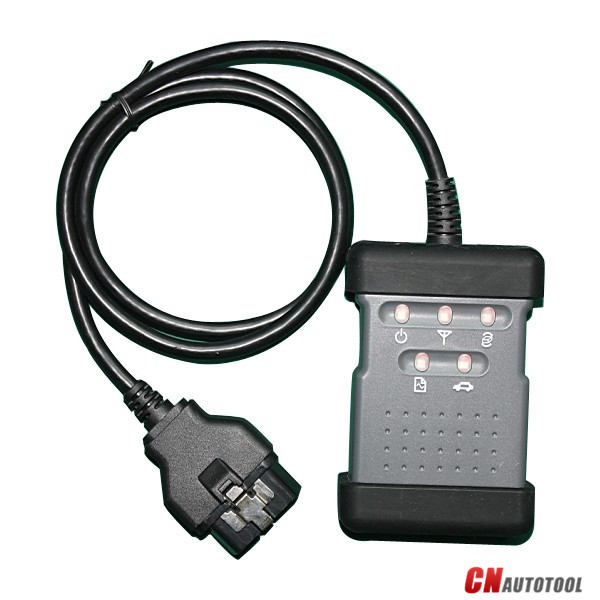
This article show a guide on how to use Nissan Consult 3 Plus to program keyless remote (T31/C11/K12).Hope it helps,and if you want to know more about Nissan Consult 3 Plus,check:Nissan Consult 3 Plus Projects.

Related Contents:

Nissan Consult 3 Plus Software Download

How to Install Nissan Consult 3 III Plus Diagnostic Software

Procedures:

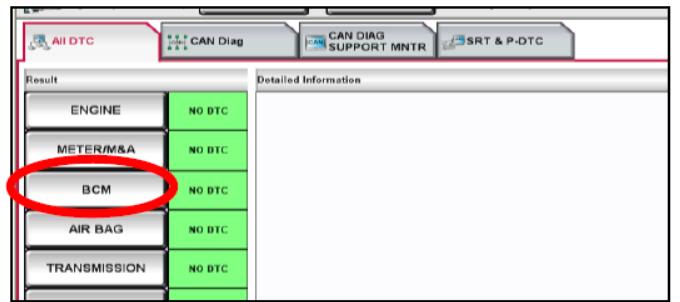
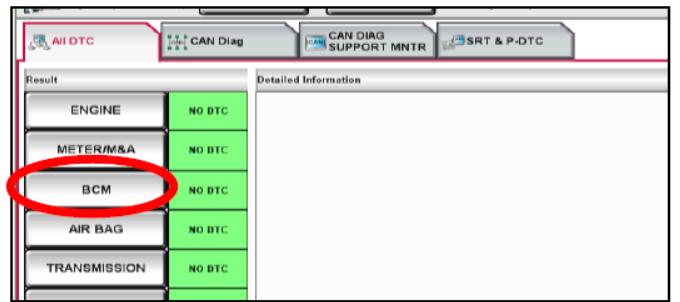
1.From the Nissan Diagnostic Tools CONSULT-III plus “All DTC” screen, select the “BCM”.

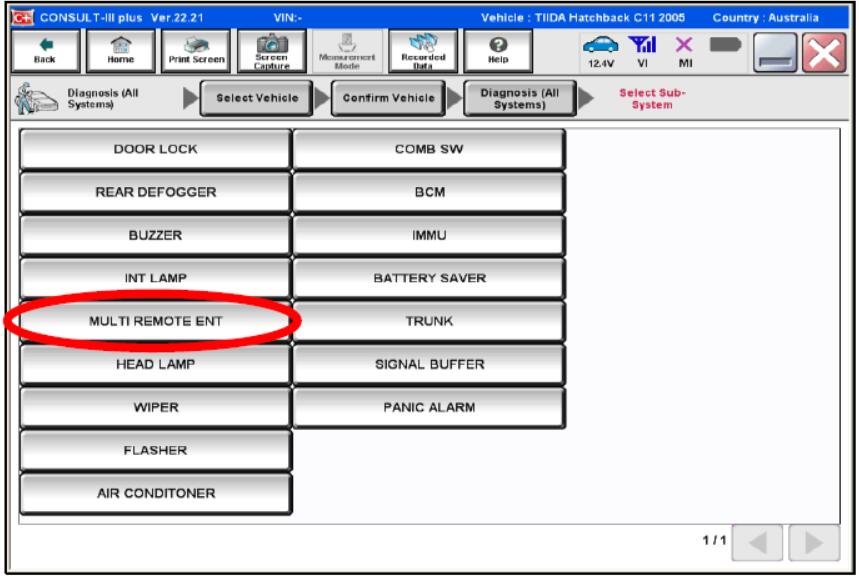
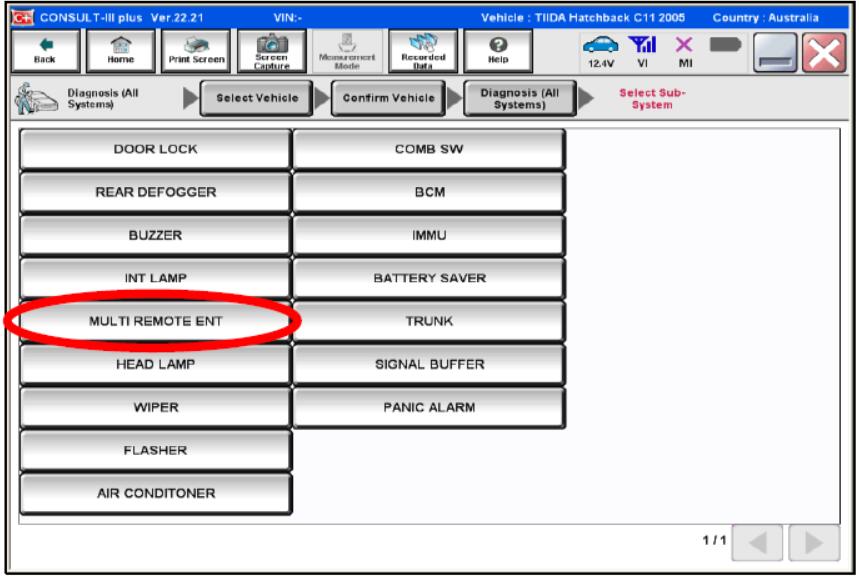
2.Select “MULTI REMOTE ENTRY”.

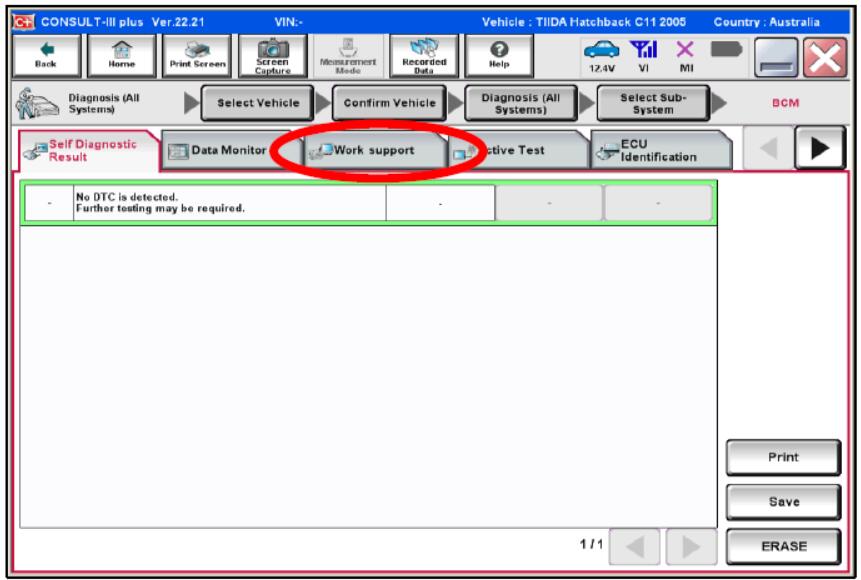
3.Select “Work Support”.

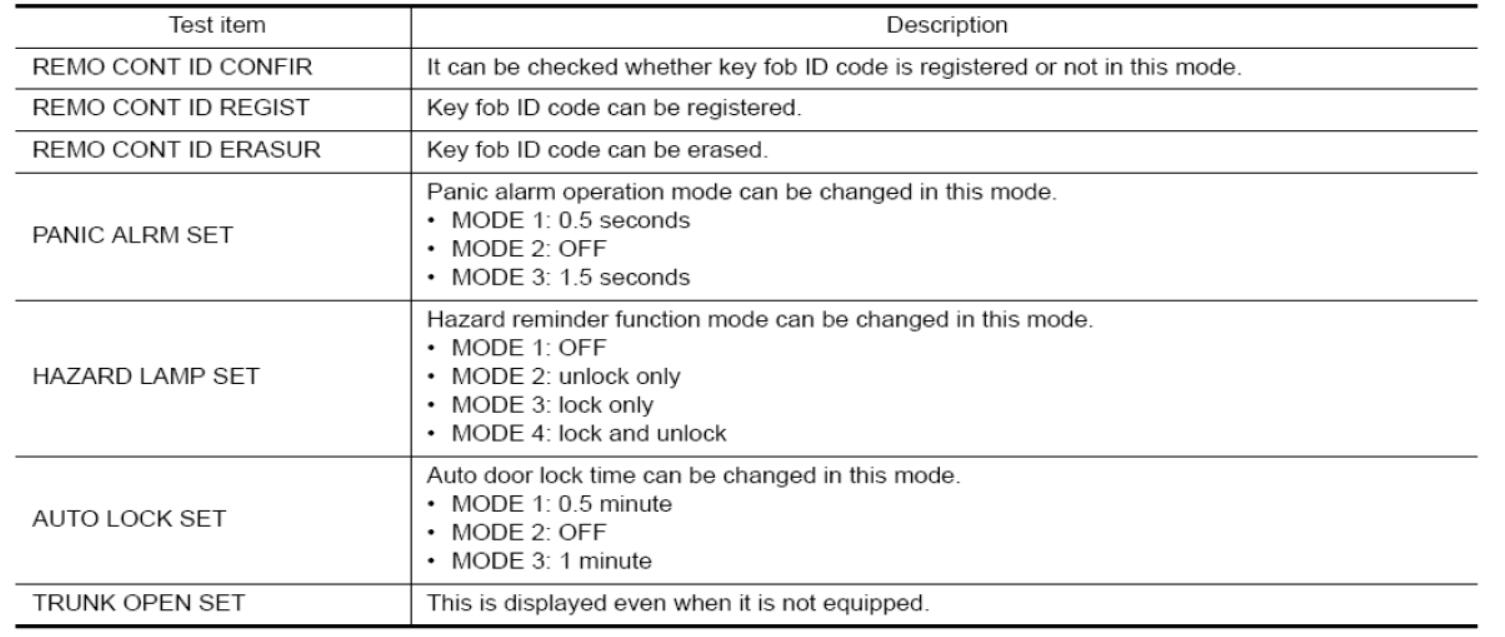
4.When the next screen appears, (section shown below) select “REMO CONT ID REGIST” function to program the remotes.

ID Code Entry Procedure

STEP 1

Close all doors (Observe the operation of the interior light with each door to ensure the door switches are OK).

STEP 2

Operate lock using the driver side door lock and unlock switch (on P/Window swassy.)

STEP 3

1.Remove and insert the key into the ignition key 6 times within 10 seconds (turning the key barrel switch from OFF to ON counts as 1 time).

2.Hazard warning lamp blinks and all door unlocks.

NOTE:On the sixth key insertion, keep the key in the cylinder with the key barrel switch ON.Does the hazard lamp blink and all doors unlock?YES >> GO TO STEP 4.NO >> GO TO STEP 1.

STEP 4

Within 3 seconds after the hazard lamp blinks and all door unlocks, turn ignition switch to the ACC position and operate lock using the driver side door lock and unlock switch.

STEP 5

1.Press the lock or unlock button of the keyfobto be added.
31-1
2.All doors unlock simultaneously.
31-2
3.Hazard warning lamp blinks and all door unlocks.
31-3
4.Key ID is registered.
31-4
Is key ID registered?

YES-1 >> When adding a keyfob: GO TO STEP 6.

YES-2 >> When ending registration: GO TO STEP 8.

NO >> GO TO STEP 1.

STEP 6

Operate lock using the driver side door lock and unlock switch.

STEP 7

1.Press the lock or unlock button of the keyfobto be added.

2.All doors unlock simultaneously.

3.Hazard warning lamp blinks and all door unlocks.

4.Key ID is registered.

Is key ID registered?

YES-1 >> When adding a keyfob: GO TO STEP 6.

YES-2 >> When ending registration: GO TO STEP 8.

NO >> GO TO STEP 6.

STEP 8

Open the all doors >> REGISTRATION END.


For more information about Nissan Professional Diagnostic Tool ,please visit our website sale@cnautotool.com


http://autotool.biz/2021/03/06/the-nissan-consult-3-plus-program-keyless-remote-t31c11k12/

2021年1月29日星期五

About V75 Consult-3 Plus Support Programming


Consult-3 Plus for Nissan is the newest Nissan diagnostic tool.
With software version V75, it can support both diagnostic and programming for Nissan till year 2018.
 Nissan Consult 3 Plus
 

Top 7 Reasons to Get Nissan Consult 3 Plus:

1.Consult-3 plus = Consult-3 for Nissan + Consult-2 for Nissan
2.Software Version: CSP Software Version : CSP V41.10; Programming Data Version : plus_V75
3.Supports all the models of the Nissan and Infiniti from 1996 to 2018, with all Consult II & III functions .
4.Calcaulate the password for the new cars till year 2018 with NISSAN Password.
5.Supports ECU Programming without card
6.Can be installed on Windows XP and Windows 7/8/10 operating system.
Cannot work on VISTA O/S. ( Windows XP SP3,Windows 7 Pro/Ultimate  is
also supported)
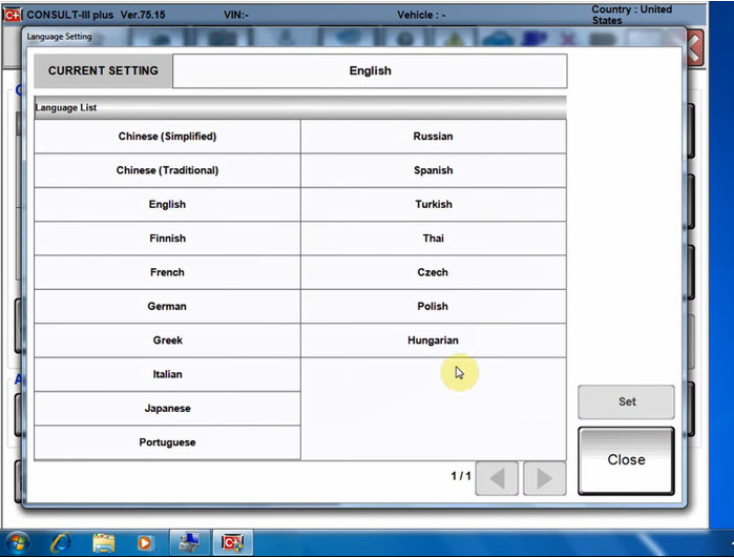
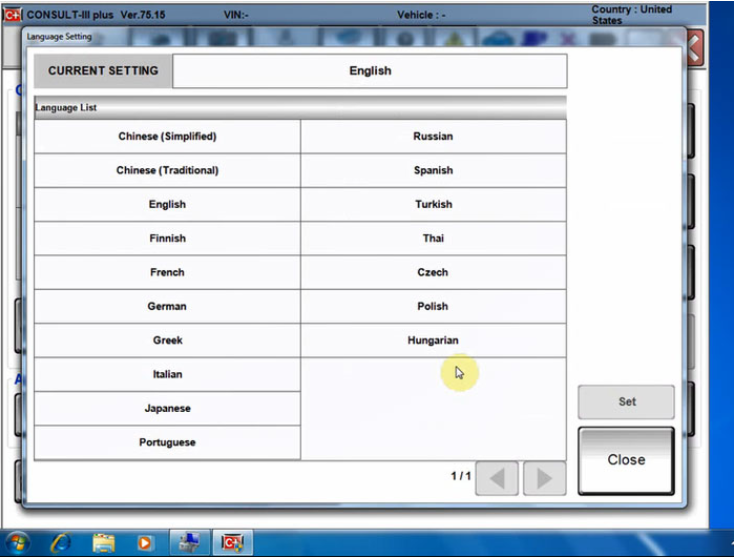
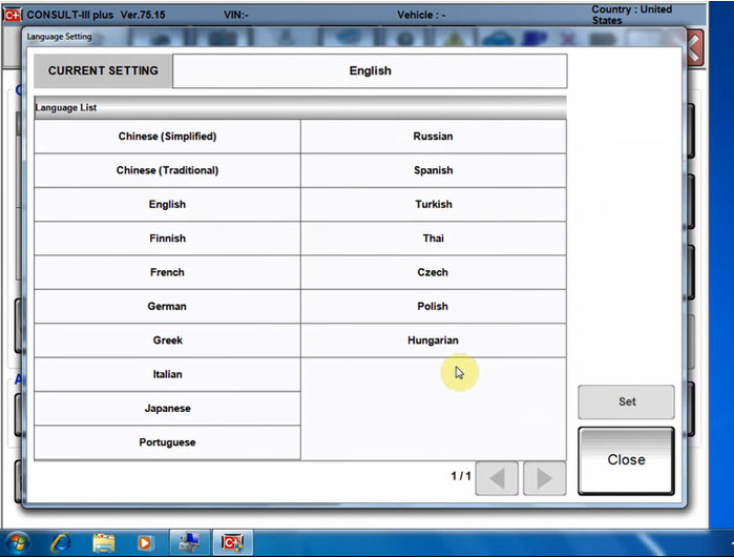
7.Suppored Languages: English, Chinese, Finnish, French, German, Greek,
Italian, Japanese, Portuguese,Russian, Spanish, Turkish, Thai, Czech,
Polish, Hungarian

31-2

Nissan Consult3 Plus v75.20 software installation:
1.Uninstall the firewall, antivirus software.
2.Install the Consult 3 plus V75.20 to the C drive in the “NTFS” format.
3.Nissan Consult 3 Plus V65.12 & up adds ECU programming function without working with immobiliser card.


Consult -3 Plus for Nissan Function:

Consult-3 Plus for Nissan can support all the models of the Nissan
and Infiniti from 1996 up till now, with all Consult II & III
functions .
And Consult III Plus can calcaulate the new 20 digital password for the Nissan new cars.


1. Consult-3 Plus for Nissan (Nissan Consult 3+) work for all nissan car , infiniti car and nissan gtr car to 2018.
2. Consult-3 Plus for Nissan work with obd-16 connector for the new kind
of car, work with 14 pin connector for the old kind of car.
3. Consult-3 Plus for Nissan support nissan car electrolic system diagnostic function.
4. Consult-3 Plus for Nissansupport nissan electromobiles such as Leaf.

Conslu-3 for Nissan Car List:

1. Scantool Diagnostics:for all Nissan,Infiniti,GTR
2. Immobi and Smart key:for all Nissan,Infiniti,GTR
3. Nissan GTR: for Nissan GTR Diagbostics and Immobi
4. Electromobiles car:for Nissan Electromobiles car Diagbostics and Immobi.For immobilizer key programming function, you need to purchase Nissan Conslut-3 Plus Security card together.

Consult-3 for Nissan Packing List:

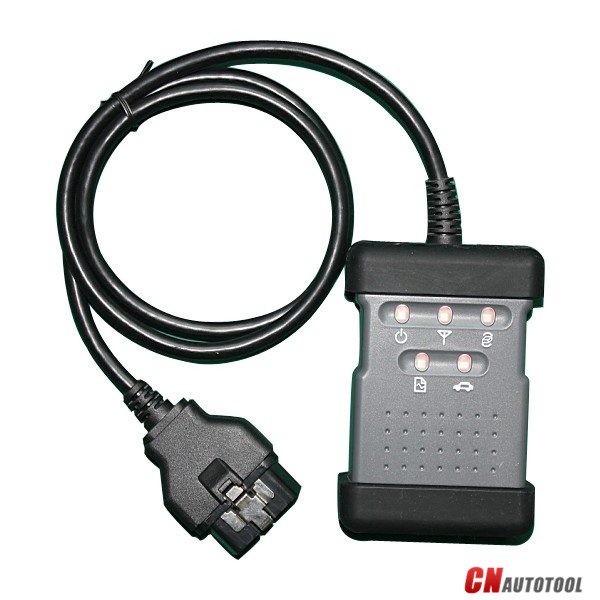
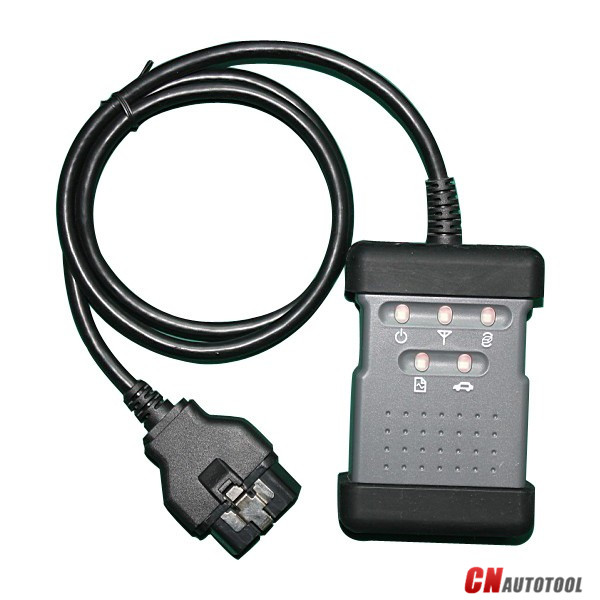
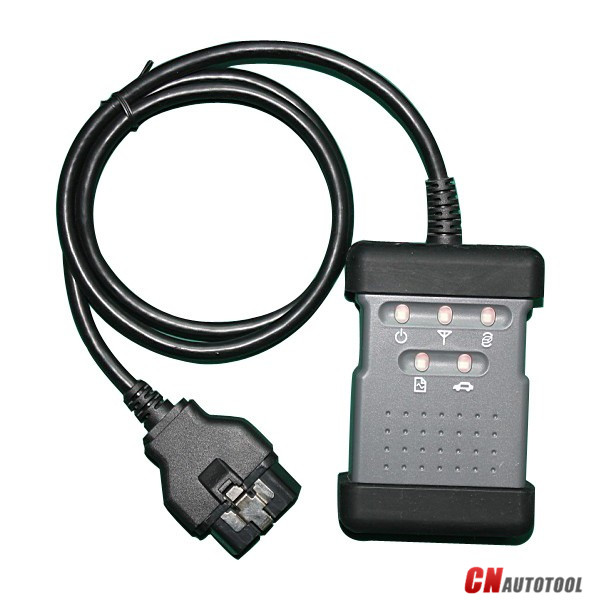
1pc* Consult 3 Plus for Nissan Vehicle Communication Module + OBD16 Cable
1pc* 14Pin Line for Nissan
1pc* USB 2.0 Cable
1pc* Bluetooth
1pc* Power Supply
1pc* Casebox
1pc* HDD 160G (option)


FAQ

Q1: What is the difference among Nissan consult 3, consult 4 and Nissan
consult 3 plus? Can Nissan consult 4 remap ECU and change IGN
time-limited parameter?
A1:
1) Nissan consult 3 and consult 4 share the same software version and
parts, the difference between them is the appearance and the quality;
2) Nissan consult3 plus is the newest-released Nissan diagnostic  it
supports the Nissan up to 2018 year. And only Nissan Consult 3 Plus can
support programming.

Q2: What additional card needed when use Nissan Consult-3 plus to make key?
A2: It need additional card, it needs for making key, this card is
Nissan Consult-3 plus Security Card, otherwise the button “Immobilizer
key” is gray color and is unavailable

Q3: Can i use this nissan consult 3 plus to program tcm and bcm?
A2: Yes, but you need to have the program file.

Q4: Does your Nissan consult 3 plus contain Battery registration card?
A6: No, it doesn’t.

Q5: Do you have any instruction for software installation?
A7: Yes. There is the software installation video on our website. There
is the software installation manual in the package too. You can follow
them to install the software. Attention: Nissan consult software must be
installed on XP system.

Q6: Can i use your nissan consult 3 to program tcm and bcm?
A8: This nissan consult 3 plus support this two function. But if you
want to use this two function, you need have the programming file by
yourself.

nissan consult 3-1

For more information about Nissan consult software ,please visit our website sale@cnautotool.com


http://obd2scantool.net/2021/01/30/about-v75-consult-3-plus-support-programming/

2020年12月24日星期四

Nissan Consult 3 Plus NOT Connect to PC (customer solutions)


Leave a reply    

This is for those with a Nissan consult 3 plus interface not connected to the PC.

Usually when users power it up, only the red power led comes on and nothing more.

attach a photo…and help on how to resolve this problem, from mhhauto.com

Nissan Consult 3 Plus

Suggestion from experienced users:

1: close anti-virus program & disconnect internet connecton

Anti virus program oder firewall/auto protect activ

This software may disturb/block the vi- recognitoin routine of c3+.

in my case (using a passthru device) i disconnected the internet connection, deactivated the auto protect function and after starting c3+ again, the led became green….

I think to remember , you have to connect the original vi to the car and the laptop, both. Only connection to the laptop is not enough for c3+ to recognize the original vi.

2: check usb circuit on pcb and usb sockets on pc

If you have basic knowledge of checking the pcb and components internally, check the usb circuit etc. and have a try on another laptop to eliminate faulty usb sockets on pc

3: check wires, solder breaks, etc.

Use a multimeter and check for broken wires between obd plug and pcb , check for solder breaks on pcb where plugs and connections are soldered to, basic fault finding, check for pcb damage like scorch marks or discoloration and components for signs of stress or damage, use a high power magnifier.

4: check continuity

Then its a case of deeper fault finding using things like scope, function generator etc, check continuity with cable plugged into the interface in case one of the contacts is bad then follow connections as far as you can on pcb to check for breaks on the board.

2020年12月22日星期二

Consult-3 Plus for Nissan Nissan Diagnostic Tool Support Programming


You can select the package with HDD( software ) or not ,we already installed the nissan consult-3 plus software into 160G SATA interface laptop HDD, the HDD can be used after 2008 year SATA hard disk interface laptop

NOTE:

1. Support both diagnostic and programming, while if you want to make key programming, still need to buy Security Card for Nissan Consult 3 Plus

2. Support GT-R,if you need test GT-R,still need to buy Nissan consult-3 plus

Top 7 Reasons to Get Nissan Consult 3 Plus:
1. Support Nissan till year 20181.Consult-3 plus = Consult-3 for Nissan + Consult-2 for Nissan
2.Software Version: CSP Software Version : CSP V41.10; Programming Data Version : plus_V75
3.Supports all the models of the Nissan and Infiniti from 1996 to 2018, with all Consult II & III functions .
4.Calcaulate the password for the new cars till year 2018 with NISSAN Password.
5.Supports ECU Programming without card
6.Can be installed on Windows XP, WIN7 & WIN10Windows XP and Windows 7/8/10 operating system. Cannot work on VISTA O/S. ( Windows XP SP3,Windows 7 Pro/Ultimate  is also supported)
7.Suppored Languages: English, Chinese, Finnish, French, German, Greek, Italian, Japanese, Portuguese,Russian, Spanish, Turkish, Thai, Czech, Polish, Hungarian

2-1

Consult -3 Plus for Nissan Function:

Consult-3 Plus for Nissan can support all the models of the Nissan and Infiniti from 1996 up till now, with all Consult II & III functions .
And Consult III Plus can calcaulate the new 20 digital password for the Nissan new cars.

1. Consult-3 Plus for Nissan (Nissan Consult 3+) work for all nissan car , infiniti car and nissan gtr car to 2018.
2. Consult-3 Plus for Nissan work with obd-16 connector for the new kind of car, work with 14 pin connector for the old kind of car.
3. Consult-3 Plus for Nissan support nissan car electrolic system diagnostic function.
4. Consult-3 Plus for Nissansupport nissan electromobiles such as Leaf.Conslu-3 for Nissan Car List:

1. Scantool Diagnostics:for all Nissan,Infiniti,GTR
2. Immobi and Smart key:for all Nissan,Infiniti,GTR
3. Nissan GTR: for Nissan GTR Diagbostics and Immobi
4. Electromobiles car:for Nissan Electromobiles car Diagbostics and Immobi.For immobilizer key programming function, you need to purchase Nissan Conslut-3 Plus Security card together.

Nissan Consult3 Plus v75.20 software installation:
1.Uninstall the firewall, antivirus software.
2.Install the Consult 3 plus V75.20 to the C drive in the “NTFS” format.
3.Nissan Consult 3 Plus V65.12 & up adds ECU programming function without working with immobiliser card.

Consult-3 for Nissan Packing List:

1pc* Consult 3 Plus for Nissan Vehicle Communication Module + OBD16 Cable
1pc* 14Pin Line for Nissan
1pc* USB 2.0 Cable
1pc* Bluetooth
1pc* Casebox
1pc* HDD 160G (option)
FAQ
Q1: What is the difference among Nissan consult 3, consult 4 and Nissan consult 3 plus? Can Nissan consult 4 remap ECU and change IGN time-limited parameter?Q1: What is the difference among Nissan consult 3, consult 4 and Nissan consult 3 plus? Can Nissan consult 4 remap ECU and change IGN time-limited parameter?
A1:
1) Nissan consult 3 and consult 4 share the same software version and parts, the difference between them is the appearance and the quality;
2) Nissan consult3 plus is the newest-released Nissan diagnostic  it supports the Nissan up to 2018 year. And only Nissan Consult 3 Plus can support programming.

Q2: What additional card needed when use Nissan Consult-3 plus to make key?
A2: It need additional card, it needs for making key, this card is Nissan Consult-3 plus Security Card, otherwise the button “Immobilizer key” is gray color and is unavailable

Q3: Can i use this nissan consult 3 plus to program tcm and bcm?
A2: Yes, but you need to have the program file.

Q4: Does your Nissan consult 3 plus contain Battery registration card?
A6: No, it doesn’t.

Q5: Do you have any instruction for software installation?
A7: Yes. There is the software installation video on our website. There is the software installation manual in the package too. You can follow them to install the software. Attention: Nissan consult software must be installed on XP system.

Q6: Can i use your nissan consult 3 to program tcm and bcm?
A8: This nissan consult 3 plus support this two function. But if you want to use this two function, you need have the programming file by yourself.

2020年10月17日星期六

How to choose a decent auto diagnostic tool to reprogram Nissan

 Reprogramming an outdated ECU is cheaper, quicker and more efficient than replacement. Nissan offers the tools, information and systems to achieve re-flashing success in your shop.


Reprogramming an ECU is an inexpensive way to improve its function. Any modern Nissan or Infiniti vehicle will likely have at least one control unit that can be reprogrammed for any number of reasons, such as reducing emissions, improving drivability, fixing bugs, or increasing component lifespan. The cost of reprogramming a control unit is only a small fraction of replacing an older control unit with an updated version, so it provides Nissan owners with a way to enjoy the fruits of engineering improvements without spending much money

All Nissan and Infiniti dealerships offer reprogramming to their customers, but as many independents know, reprogramming is not a “dealer only” service. An independent shop that is serious about offering its customers good value should be equipped and competent enough to offer reprogramming. Many customer complaints simply cannot be resolved without a change in software, so a shop that is not prepared to install the latest software will not be able to fix the car. That’s a pretty compelling reason to read up and tool up.

Reprogramming tool – Where to?

The owner is able to purchase the genuine equipment, information, and calibration files the dealerships use www.nissantechmate.com, plus there’s even a less-expensive option available off https://www.cnautotool.com/ that provides working china clone equipment for reprogramming offline.

The following Nissan consult iii Plus options are available:

16-1

CONSULT II

This was a great scan tool and is still suitable for reprogramming, but it’s past its prime. The CONSULT III or III plus offer post-2006 coverage and a far easier procedure. The CONSULT II is no longer available for purchase, but if you already own one, Nissan is still supporting reprogramming via this device, so it’s an acceptable choice for pre-2007 vehicles.

CONSULT III

The CONSULT III is a powerful scan tool and is currently the best way to flash Nissan control units.

The original kit can be purchased from www.nissantechmate.com, and comes with a ToughBook, VI (Vehicle Interface), MI (Measurement Interface), and accessories

CONSULT III Plus

The CONSULT III plus is a full-featured scan tool and is the fastest and easiest way to get into re-flashing. It will also have the widest coverage. It has an improved interface that is more intuitive than that of the CONSULT III. The user will need to provide a laptop; the kit comes with only the VI (Vehicle Interface) and software.

You’ll be able to purchase the C-III plus kit to upgrade your existing C-III, or purchase a full C-III plus kit (including laptop) at www.nissantechmate.com later this year. Remember, Nissan CONSULT software will only operate on the special Toughbook.

Also, CONSULT III Plus clone comes with high quality confirmed. 545 USD should be the cheapest way to do Nissan ECU reprogramming:

– https://www.cnautotool.com/goods-6689-Nissan-Consult-III-Plus-with-DELL-D630-Laptop.html you can do offline reprogramming without any account and password

Nissan-validated J-2534 pass-thru interface

A J-2534 pass-thru interface can be used in conjunction with NERs (Nissan ECU Reprogramming Software) to re-flash Nissan and Infiniti vehicles. NERs is not a diagnostic interface; it can only be used for re-flashing, so that is one disadvantage of going the J-2534 route. Another potential downside is reliability. Nissan puts a lot of R&D into the CONSULT scan tools, and they have been extensively tested at dealerships. A generic J-2534 device will likely not see action until later in the product lifecycle, so may not be as polished. That being said, Nissan has tested and validated a few of the J-2534 devices available, and has determined that they seem to work well with NERs.

The following J-2534 pass-thru interfaces are currently Nissan-validated:

DrewTech CarDAQ-plus
Actia Passthru+XS
DrewTech Mongoose
Consult VIs (III and III plus)

16-2

Consult 3 (Plus) china clone – No worries!

The cloned Consult 3 (Plus) is for personal use and repair shops sometimes, but NOT for people looking for the original only.

The chinese is good at cloning. But you may worry about the quality. Here, a good tip for you is “you will get what you pay for”. you might see a tool at different prices and sometimes there might be a big gap between the cheapest one and the most expensive one. Just learn more about the site to check if it’s reliable or not. Usually, amazon or ebay should be your way to go. But for car diagnostic and programming tool, you might need help/tech support from experts. Search “car diag” on google and you’ll find a lot. Here OBD2TOOL is the first one that google suggested!

It’s not that hard

Reprogramming is something most technicians will find fairly easy. If you have computer skills, you’ll likely feel like a pro after you have a couple experiences under your belt. However, don’t get too comfortable and start to get sloppy. If a reprogramming fails, the ECU may be permanently damaged. This is colloquially referred to as “bricking” because the ECU becomes about as useful as brick for vehicle control (yet probably not as useful as a brick for structural purposes). Regardless, it will be of little use to anyone who is not looking for a very expensive paperweight. The path to avoiding a brick is easy: Just follow the instructions outlined in the TSB and the reprogramming overviews. The key to a successful re-flash is avoiding interruptions.

First, the ECU needs an adequate voltage supply. If the vehicle’s 12V battery does not maintain a steady voltage during the reprogramming, the procedure may fail. Therefore, the battery should be tested before beginning to flash. However, even if the battery is in great condition and fully charged, it’s a very good idea to have a backup, just in case. A fully-charged booster pack is one option, but then there’s always the chance that the booster pack might not be as charged as you think it is.

The ideal solution is a power supply. It’s like a battery charger, but its output is very clean with very little ripple, and the “charging” voltage is much lower than normal, typically 13.5V. The Nissan-recommended Midtronics GR8-1200 has a power-supply mode that works well for reprogramming. There are other products that will work, but you’ll need to verify their suitability on your own. Don’t use a standard battery charger. They are often very “dirty” (AC in the DC) and usually have the potential to charge at too high a voltage for safe re-flashing.

The laptop and VI, or scan tool, will also need a steady power supply. Even if the laptop battery is fully charged, and in good condition, plugging the laptop into a wall outlet is a good idea. It just takes a few seconds and if the laptop were to power down midflash, it would cause some real problems.

Preventing software interruptions is also important. The laptop computer used for re-flashing should have minimal software installed. There’s no way to predict how NERS will be affected by the millions of different software packages available. Keeping the system clean is the best way to avoid conflicts.

This may sound crazy to IT managers, but automatic Windows updates should be turned off. One reason is that an automatic restart is bad news during mid-flash. If the technician is watching the flash, he can prevent the restart, but most techs will start the flash, and then do something else while it completes. The other reason is that major changes in the operating system may cause problems. For these reasons, updates should be done manually, and major updates, like service packs, should not be installed until you’ve verified that they won’t cause problems.

Wireless communications are especially prone to interference. You may find some Nissan material that depicts a CONSULT III with a wireless connection to the VI while reprogramming, but using the USB connection may be a better choice. Be sure the USB cable connections are tight. Loose connections can cause an interruption and resulting “brick.” Cell phones, lighting, welding, and a plethora of other noisy electrical devices and electronics can be found in a shop environment. Why take a chance?

The final source of potential interruption is human interference. Perhaps a co-worker notices you’ve “left the key on” and helps you out by turning it off. Or, he decides he needs to move the car. Or, he needs the scan tool and sees that you aren’t using it right now. Unless you plan on standing guard, post a sign on the car so others know what’s going on and leave the car alone.

When and how to re-flash

Now you know what hardware you’ll need to begin re-flashing and how to avoid damaging the ECU, but there are still some lingering questions such as, “When should a re-flash be performed?” and “How is it done?”

The decision to re-flash always starts with a Technical Service Bulletin. Whenever an ECU update is created, a TSB is issued to explain the reasons for the update. Any symptoms or trouble codes will also be disclosed. Applicability, warranty information, and any special instructions can also be found in the TSB. Always read the TSB in its entirety before beginning work, even if you are familiar with the reprogramming process. Application-specific instructions included in the TSB may save you from disaster.

16-3

Some battery chargers have the additional circuitry necessary to supply clean, steady power, but most do not. If the charger doesn’t have a specific power supply or reprogramming mode, it probably isn’t suitable for reprogramming use.

16-4

Go to the Nissan or Infiniti Techinfo sites to download ECU calibration files, NERs, and find detailed instructions.

Once you’ve confirmed that there is an applicable calibration file for the vehicle with a TSB, you’ll need to check the current ECU part number (which will change with every calibration). The current ECU part number can be retrieved with the CONSULT II, III, or III plus. If the calibration applies to the vehicle and the ECU part number reveals the calibration has not been applied yet, it’s time to start flashing.

Calibration files can be purchased and downloaded from the Nissan or Infiniti Techinfo sites (www.nissantechinfo. com or www.infiniti-techinfo.com). It’s not necessary to have a Techinfo account to purchase and download calibration files. However, you will need an account to view full TSBs, and access to the relevant TSB should be considered mandatory since it may contain information that is necessary for success.

Techinfo subscriptions can be purchased for a single day ($19.99/day), 30 days ($2.50/day), 90 days ($2.50/day) or a full year ($720, or $2/day). The calibration files are a separate purchase, and are not included with the Techinfo subscription. Calibration files are $19.99 each. So the total cost for information and software will be between $22 and $40. The procedure for downloading the calibration file is fairly straightforward. Select the “Available Products” drop-down menu.

ECU Reflashing Using a J-2534 pass-thru interface

If you are using a J-2534 pass-thru interface, choose “Reprogramming using J-2534-1”. This will take you to a page that explains the requirements and allows you to download the NERs Operation Manual and purchase the NERs software if you don’t already own it.

Once you’ve read this page and verified you have everything you’ll need, click on the “Reprogram” tab. Once there, either enter the 10-digit ECU number in the search field, or select it from the drop-down menu. The ECU number should be retrieved with a scan tool, not by using the ECU label. The updated part number will then be displayed. Click on “Submit, Purchase, Check Out,” and continue to follow the prompts, entering your address, credit card information, etc.

Once purchased, you’ll be allowed to download the file. You’ll only have access to the download page for 24 hours, so download your purchases right away. You’ll need to place the downloaded files in a specific directory so that NERs will be able to find it. For a J2534 device, the directory is C:\Program Files\Nissan J2534 ECU reprogramming software\Application data\Reprogramming Data

If using the NERs and a pass-through device, follow the prompts to install the update. This has been a quick overview of the process. Full instructions are available in the NERs Operation Manual, and should be consulted before re-flashing.

ECU Reflashing Using Nissan CONSULT II

If you plan to use the CONSULT II for a 2006 or earlier vehicle, there is an extra step. The purchased calibration must be downloaded from the Techinfo site toa PC, to a CONSULT II programming card, then to thevehicle. The transfer from the PC to the CONSULT II is done with free software available for download from Techinfo. You’ll find CONSULT II compatible calibration files and the free CONSULT II transfer software on theTechinfo site under “Reprogramming using the CONSULT II.”

The only tricky part of using the CONSULT II for reprogramming is transferring the files from the PC to the reprogramming card in the CONSULT II. There are two choices for data transfer, either RS-232 (serial port) or FTP (Ethernet port)

16-5

Consult II reprogramming file transfer options.

The RS-232 setup is simple, but is very slow and most PCs don’t have a serial port these days. If a PC lacks a serial port, you can purchase a USB to serial adaptor, but most of the time you’ll need to do a bit of setup and configuration to make it work.

The FTP transfer is fast, and virtually all PCs have a network card installed. However, if you’re a networking novice, the setup can be a little daunting. Typically, the easiest way to set up is to add the CONSULT II to an existing network structure. Just assign the CONSULT II an IP address that is unique, but still on the same subnet as other PCs on the network, then connect the CONSULT II via a standard Ethernet cable to a switch or router rather than using the crossover cable supplied with the CONSULT II. This method is faster than breaking the existing network configuration on the PC to use the crossover cable for a PC to PC (CONSULT II) connection. If this makes no sense to you, go with the serial connection and save yourself the hassle.

The Reprogram Card Operation Manual can be found in the CONSULT II reprogramming software, which is available as a free download from the Techinfo site on the “Reprogramming using the CONSULT II” page. The link to the manual is about seven clicks in the software. The PDF manual can be saved or printed, and should be read before attempting to use the software.

16-6

You’ll need this free software to transfer files from your PC to the Consult II.

ECU Reflashing Using Nissan CONSULT III and Consult III plus

The CONSULT III and III plus are a lot easier to use for reprogramming. The software you’ll need is already installed and the process is very straightforward. Purchase and download the calibration file to the directory specified in the readme.txt file that comes with the calibration, then install it on the vehicle. The relevant TSB will contain vehicle-specific instructions, and if you are not yet familiar with the procedures, there is usually a “click here” link within the TSB that will take you to more general reprogramming instructions.

Depending on the vehicle and the situation, there may be some post-flashing maintenance that needs to be performed. Specific instructions can be found in the TSB, so be sure to read the whole thing and follow all instructions.

Some ECUs can survive an incomplete flash. So, if you trip over the VI cable at 25% downloaded, don’t fall on your sword right away. You may be able to save the ECU before your boss finds out. You can find information about how to go about recovering after an incomplete re-flash in TSBs. Because TSBs can’t be searched with the Find Publications search, you may want to dig around a bit and find these two TSBs: CONSULT III Reprogramming General Procedure and the ECM Reprogram Interruption Recovery General Procedure. Print or save them before you need them, and one day you may be glad you did.
2020年10月16日星期五

Newest Nissan Consult 3 Plus All Version Free Download


What Nissan Consult 3 Plus?

Nissan Consult 3 Plus is a diagnostic software special for Nissan,support all the models of the Nissan and Infiniti from 1996 up till now, with all Consult II & III functions.It can support all Nissan car,Infiniti carand Nissan GTR.
Nissan Consult 3 Plus
Nissan Consult 3 Plus Functions List:

Supports ECM reprogramming on most 1999 model year and later and some TCM and ABS/VDC reprogramming.

Supports blank ECM and TCM programming.

Supports ECM reprogramming on most 1999 model year and later and some TCM and ABS/VDC reprogramming.

Supports blank ECM and TCM programming. September 2013 Nissan and Infiniti began the phase-in of “blank” service part ECMs and TCMs. Depending on the model and model year, replacement modules come WITHOUT software. When the replacement module is installed in an applicable vehicle for any reason, it will need to be programmed.

Optional Security Card-Type A Kit must be approved security professional to purchase

Nissan Consult 3 Plus Specifics:

PC Based: PC Require

Model Year Coverage: The Consult-III Plus is required for all 2013 and newer Nissan and Infiniti vehicles. In addition, the Consult-III Plus is required for all: 2011 and newer Nissan LEAF, Quest, and Murano CrossCabriolet vehicles; 2012 and newer Nissan GT-R and NV vehicles; and 2012 and newer Infiniti M and M Hybrid vehicles. The Consult-III Plus software is continuously being updated to accommodate new vehicles as well as older model years dating back as far as 1996.

PC Recommended: Nissan Specific, Panasonic Toughbook

Software License:https://www.nissan-techinfo.com/

Nissan Consult 3 Plus Support Car Models:

Diagnostics:for all Nissan,Infiniti,GTR
Immo and Smart key:for all Nissan,Infiniti,GTR
Nissan GTR: for Nissan GTR Diagbostics and Immobi
Electromobiles car:for Nissan Electromobiles car Diagbostics and Immo

Nissan and Infiniti from 1996 up till now
Note:Consult III Plus – 1996MY up

Nissan Consult 3 Plus Support Languages:

English, Portuguese (Newly Add), French, German, Spanish, Italian, Japanese, Russian, Finnish, Greek, Chinese(Simplified), Chinese(Traditional)

Nissan Consult 3 Plus Installation OS Requirement:

Operating System Environment

*   Windows: Windows? 2000, Windows XP, Windows Vista, Windows 7, 8 or 8.1
*   Mac: Macintosh 8.x, 9.x, OS X
*   Disk Storage: 10 MB available hard-drive space
*   Display Resolution: 800 x 600 pixels (1024 x 768 recommended)

Nissan Consult 3 Plus Installation Guide:

The installation methods of different Consult 3 may be similar,if there here is no version that you have or you have higher version,please try to install it referring to these method by yourself.

Suppored Languages: English, Chinese, Finnish, French, German, Greek, Italian, Japanese, Portuguese,Russian, Spanish, Turkish, Thai, Czech, Polish, Hungarian

2-1


2020年9月27日星期日

How to set up Nissan consult 3 plus v75.20?


1. Support both diagnostic and programming, while if you want to make key programming, still need to buy Security Card for Nissan Consult 3 Plus  for Nissan Consult 3 Plus

2. Support GT-R,if you need test GT-R,still need to buy Nissan consult-3 plus GTR Card

Top 5 Reasons to Get Nissan Consult 3 Plus:

1.Consult-3 plus = Consult-3 for Nissan + Consult-2 for Nissan
2.Software Version: CSP Software Version : CSP V41.10; Programming Data Version : plus_V75
3.Supports all the models of the Nissan and Infiniti from 1996 to 2018, with all Consult II & III functions .
4.Calcaulate the password for the new cars till year 2018 with NISSAN Password.
5.Supports ECU Programming without card
6.Can be installed on Windows XP, WIN7
7.Suppored Languages: English, Chinese, Finnish, French, German, Greek, Italian, Japanese, Portuguese,Russian, Spanish, Turkish, Thai, Czech, Polish, Hungarian

31-1

How to set up Nissan consult 3 plus v75.20?

1.First read tips:

Uninstall the firewall, antivirus software.

anti-virus software can flag up Consult 3 plus software as having a virus. This is a false positive and is due to the software containing the application file like .exe. So Before setup the device software, please disable/uninstall anti-virus software or install a more reliable virus scanner!

2.Setup the Consult 3 plus V75.20 to the C drive in the “NTFS” format.

Here several pieces of simple guide to follow:

Open IE exploer browser to run “Start.html” .
Open folder “C30 License” to run “C3PCheckLicense.exe”.
Run “V80003T_20101215_x32.exe” to enable Bluetooth.
Open folder “ReprogramData” to run “pus_v65.1F.exe”.

Then, Nissan consult 3 plus v75.20 software will work greatly.


FAQ
Q1: What is the difference among Nissan consult 3, consult 4 and Nissan consult 3 plus? Can Nissan consult 4 remap ECU and change IGN time-limited parameter?
A1:
1) Nissan consult 3 and consult 4 share the same software version and parts, the difference between them is the appearance and the quality;
2) Nissan consult3 plus is the newest-released Nissan diagnostic  it supports the Nissan up to 2018 year. And only Nissan Consult 3 Plus can support programming.

Q2: What additional card needed when use Nissan Consult-3 plus to make key?
A2: It need additional card, it needs for making key, this card is Nissan Consult-3 plus Security Card, otherwise the button “Immobilizer key” is gray color and is unavailable

Q3: Can i use this nissan consult 3 plus to program tcm and bcm?
A2: Yes, but you need to have the program file.

Q4: Does your Nissan consult 3 plus contain Battery registration card?
A6: No, it doesn’t.

Q5: Do you have any instruction for software installation?
A7: Yes. There is the software installation video on our website. There is the software installation manual in the package too. You can follow them to install the software. Attention: Nissan consult software must be installed on XP system.

2020年9月24日星期四

Nissan Consult 3 Plus Program Keyless Remote (T31C11K12)


CnAutotool.com show a guide on how to use Nissan Consult 3 Plus to program keyless remote (T31/C11/K12).Hope it helps,and if you want to know more about Nissan Consult 3 Plus,check:Nissan Consult 3 Plus Projects.

Nissan Consult 3 Plus

Procedures:

1.From the Nissan Professional Diagnostic Tool CONSULT-III plus “All DTC” screen, select the “BCM”.
31-1
2.Select “MULTI REMOTE ENTRY”.
31-2
3.Select “Work Support”.
31-3
4.When the next screen appears, (section shown below) select “REMO CONT ID REGIST” function to program the remotes.
31-4
ID Code Entry Procedure

STEP 1

Close all doors (Observe the operation of the interior light with each door to ensure the door switches are OK).

STEP 2

Operate lock using the driver side door lock and unlock switch (on P/Window swassy.)

STEP 3

1.Remove and insert the key into the ignition key 6 times within 10 seconds (turning the key barrel switch from OFF to ON counts as 1 time).

2.Hazard warning lamp blinks and all door unlocks.

NOTE:On the sixth key insertion, keep the key in the cylinder with the key barrel switch ON.Does the hazard lamp blink and all doors unlock?YES >> GO TO STEP 4.NO >> GO TO STEP 1.

STEP 4

Within 3 seconds after the hazard lamp blinks and all door unlocks, turn ignition switch to the ACC position and operate lock using the driver side door lock and unlock switch.

STEP 5

1.Press the lock or unlock button of the keyfobto be added.
31-1
2.All doors unlock simultaneously.
31-2
3.Hazard warning lamp blinks and all door unlocks.
31-3
4.Key ID is registered.
31-4
Is key ID registered?

YES-1 >> When adding a keyfob: GO TO STEP 6.

YES-2 >> When ending registration: GO TO STEP 8.

NO >> GO TO STEP 1.

STEP 6

Operate lock using the driver side door lock and unlock switch.

STEP 7

1.Press the lock or unlock button of the keyfobto be added.

2.All doors unlock simultaneously.

3.Hazard warning lamp blinks and all door unlocks.

4.Key ID is registered.

Is key ID registered?

YES-1 >> When adding a keyfob: GO TO STEP 6.

YES-2 >> When ending registration: GO TO STEP 8.

NO >> GO TO STEP 6.

STEP 8

Open the all doors >> REGISTRATION END.