显示标签为“MB SD Connect C4”的博文。显示所有博文

2021年12月1日星期三

How to solved Mercedes Star Diagnostic Xentry Das License Key is Corrupted


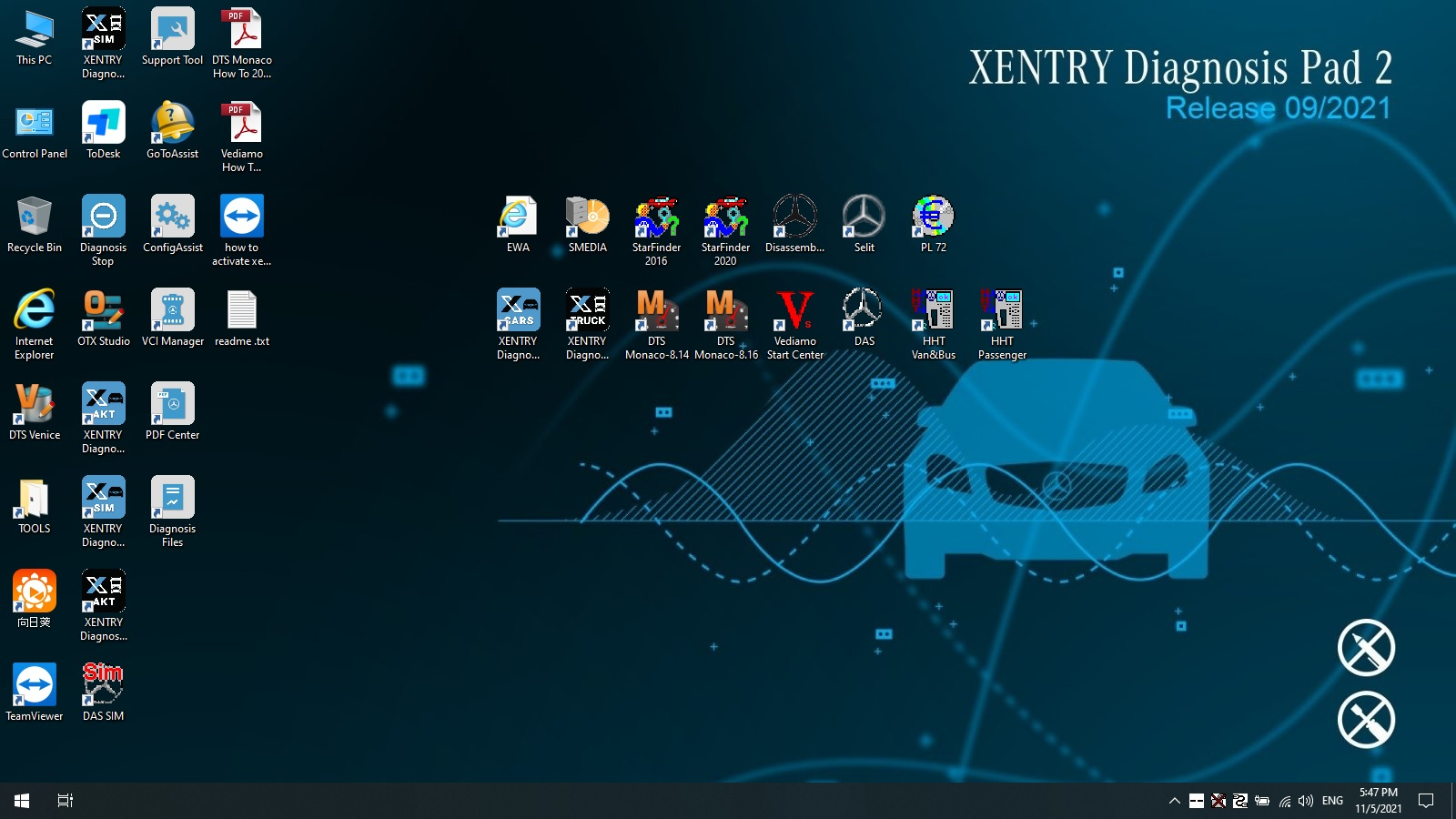
MB Star Diagnosis Software update to 2021.09 MB Star C4 SDConnect xentry software. Mercedes Star Diagnosis Software have Das license key is corrupted met by customer who order 2021.07 xentry diagnostic software. CnAutotool.com sharing Mercedes Star diagnosis Xentry Das license key is corrupted solution as following.
2021.09 Mercedes Star Diagnosis Software Xentry DAS Software for MB SD Connect C4/C5
solved Mercedes Star Diagnostic-1
Hello,
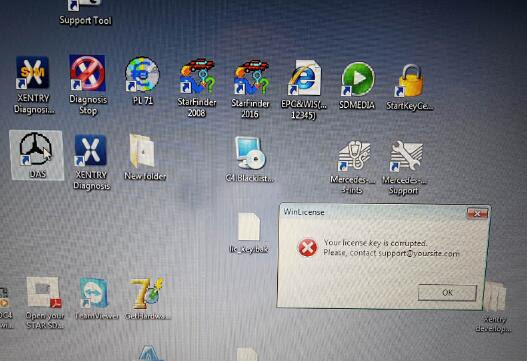
I got 07.2021 Xentry DAS Windows 7 software HDD is giving me the following massage:
winLicense
your license key is corrupted
please contact support@…
How to solved it? Any help can offer?
solved Mercedes Star Diagnostic-2
Best Regards
Technician have been check the error, this is DAS need activation.
Mercedes Benz Diagnostic Software Xentry Das license key is corrupted solution:
Xentry/DAS activation:
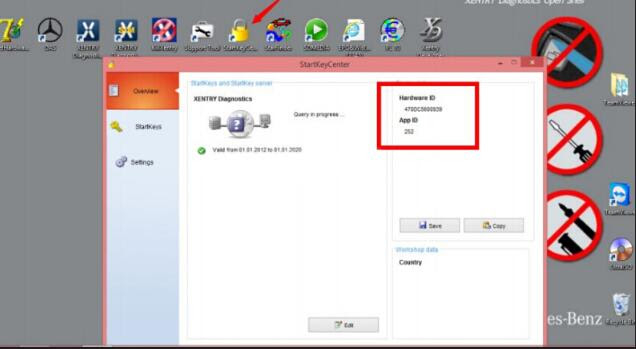
Step 1: Run StartKeyCenter to get ID for activation
Open “StartKeyCenter” on Desktop, to get the SD connect c4 Hardware ID and App ID
solved Mercedes Star Diagnostic-3
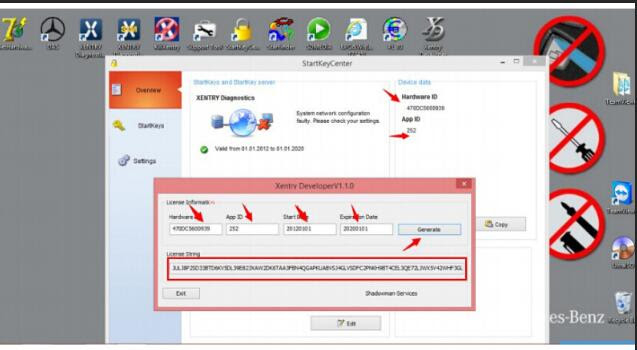
Complete Licence information (Hardware ID, App ID, StartDay, ExpirationDay), then click “Generate” to get License String
solved Mercedes Star Diagnostic-4
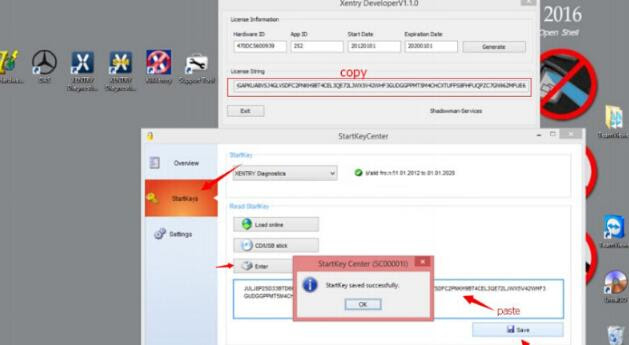
Copy License String, then go to “StartKeys”, click “Enter” to read StartKey, then “Save” data
solved Mercedes Star Diagnostic-5
Step 2: Reactivate Xentry/DAS
Go to Local Disk C:/ ProgramData/ LicDir, the copy and paste “lic_key_2.dat”, re-name as “lic-key_2.x4711”
Xentry Your License key is corrupted 5 Mercedes Star Diagnostic Xentry Das License Key is Corrupted Solution
Setup Properties of “lic-key_2.x4711”, select Read-only
Then open XENTRY Diagnostics Openshell and close it
(NOTE: this avoids the activation code to be lost and reactivate XENTRY)
More question about Mercedes benz star diagnostic tool mb star c4 sd connect Xentry diagnostic software just keep your order number to contact us freely with sale@cnautotool.com .
2020年9月28日星期一

How to solve MB SD C4 Insert Batteryi and Initialization Failed


Mercedes Benz MB SD Connect Compact 4 MB Star diagnostic system “Please insert batteries” and“Initialization of diagnosis multiplexer failed” solution are provided.MB SD C5
Problem:
One of the Mercedes MB SD Connect C4 user has the problem when using the star C4 diagnostic system.
Error 1: Please insert batteries.

Error 2: Initialization of diagnosis multiplexer failed Possible reason: He has not got the MB SD C4 connected with Dell D630 laptop to build communication. Mercedes Benz EIS Trouble Repair Guide Solution: Check the SD Connect C4 icon on the bottom of the toolbar, power on the SDConnect and connect the diagnostic scanner with computer, if the #21 device displays in “x” status,it indicates the C4 multiplexer is not well connected or well configured,how to tell:
1.Open laptop Local Network Connection->SD C4 WLAN,disconnect then connect to check if network connection has changed. If the network remains unchanged,change another laptop and do the same setting.
2.If network status did not change on any laptops,then change a new LAN cable.If still no changes,you have to send back your SD C4 main unit for repair.


35.2

35.3


2020年9月25日星期五

MB SD Connect Compact 4 Star Diagnosis Problem Solutions


2-1
Purchase Link: https://www.cnautotool.com/category-172-b0-MB+Star+C4.html

 MB Star C4 Features:
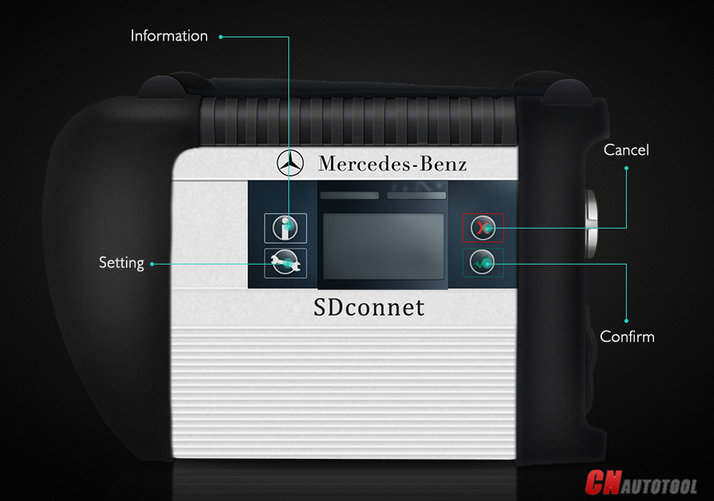
1. New MB SD Connect Compact 4 Star Diagnosis support wireless diagnose;
2. New MB SD Connect Compact 4 Star Diagnosis not only support K line diagnose and CAN BUS,but also UDS diagnose protocol.
3. Multiplexer now use Lan cable to connect
4. Connector adopt Military quick swap technology, it can support 10,000 times pull plug, more stable;
5. All core accosseries adopt original new packing chip, and 24hours test, guarantee the quality of the products;

1. About computer system requirement

Q: Blue screen after insert SD C4 Dell D60 hard disk into the computer and open it.

A: Make sure Dell D630 computer is integrated video card and with 1GB memory, because the D630 of discrete video card is easy to have blue screen or shutdown and restart, restart and shutdown.

Q: When click “Diagnostic” to find “Fingerprint ID” of MB SD C4 2019.07, got an error” Internal error (3.17) – 3.89 You must contact the user help Desk “. (Shown picture below)

A: Check whether computer is compatible with mb sd connect compact 4 star diagnosis 2019.07 software. If choose d630 hard disk, it needs to work with Dell D630 computer with integrated video card and 1GB memory; if choose movable hard disk, it’s requirement to the computer is: CPU 2.0GHZ or above, 2GB memory or more, Windows XP professional.

2. About languages available

Q: Is DAS available with 21 languages and optional to reset? Or only English available?

A: The DAS on the desktop is only English available, after enter into Xentry you are allowed to set the language you want. Just enter into Xentry whatever car models you want to diagnose, and if the car model should be diagnosed and programmed in the DAS but you enter Xentry, it will automatically switch into DAS and the DAS language will be as the same as the Xentry language.

3. About Software update

Q: MB SD C4 Connect Compact 4 Star update error: the software update was aborted. Please repeat the update process. (662)

A: do not update MB SD Connect Compact 4. You are allowed to update hardware version to 2.02, not 2.2.

At present, the lastest version software for MB STAR C4 version 2019.07 ,

Here we have HDD and SSD for choice : https://www.cnautotool.com/goods-4829 MB+SD+Connect+Compact+4+Star+Diagnosis+Tool+With+WiFi+201607+Plus+EVG7+Diagnostic+Controller+

Tablet+PC+.html

4.About activation/code

Q1: When Set up MB SD connect Compact 4 hard disk, while got a message reading “No access authorization code! Please contact the Star diagnosis call center.

A1: It needs activation, please send us Hardware fingerprint, LAN-ID and HW-ID, then we will help you active.
Our engineer can support you via teamviewer.

MB Star SD Connect C4 Wire Connection Picture

sd c4


2018年12月26日星期三

Where to buy good quality MB SD Connect C4 with laptop ?

SD Connect C4 connection problem-Das fault (1.1)-1.501.9878
The mux is connecting with diagnosis computer both by lan cable or wifi(passed and respond to all self tests).no lcd problems or blocked!The fault comes when das try to initialize the mux green led blinks about 10 second and this fault comes no matter is from das standalone or launched from xentry .

Solutions:
You must change IP address in windows : 172.29.127.12
Go into "Control Panel","Network Connection","Local Network Connection">right click>properties>choose this one with TCP/IP,select this,choose properties,choose manually ip and put this ip "172.29.127.119",mask 255.255.255.0(as you will get when type ip),rest of field,leave blank .
It was done !
Everything test well before send it out ,thanks

 For more information,please visit our website: www.cnautotool.com